The Primer · Tools & Stacks
How to use Replit Agent: from prompt to deployed app
Vendor-neutral
Replit Agent is an AI that builds a working app from a plain-language prompt inside Replit's browser IDE, then deploys it on the same page, with nothing installed on your machine. The part worth understanding before you start is the meter: Agent is billed by effort, one charge per checkpoint, and Replit does not publish a fixed price per checkpoint. This is the whole thing, first prompt to live URL, and how the billing actually works.
Replit Agent is the tool that turns “I want an app that does X” into a running, deployed app without you installing anything or writing the first line. You describe the idea in chat, and Agent sets up the project, writes the code, tests it, and puts it online, all inside Replit’s browser IDE. Unlike a chatbot that only answers, Agent takes action. For someone who wants the shortest path from idea to a live URL, that is the whole appeal, and the one thing to understand before you start is how the meter works, because Agent bills by effort.
Here is the shape of it. Open Replit, describe your app, and Agent plans, builds, and tests it while you watch a live preview. You refine by chatting, and you deploy from the same screen when it is ready. The cost is charged per checkpoint as the Agent completes work, and because that is effort-based rather than a flat sticker, the skill is scoping each request so it does less. Everything below is the how.
What Replit Agent is
Replit Agent is Replit’s AI app builder, and it lives inside Replit’s cloud IDE, so the entire loop, editor, terminal, database, and hosting, runs in a browser tab with nothing set up locally. The docs describe it plainly: rather than only answering questions, Agent “sets up your project, creates applications, checks its work, and fixes problems.” You are giving instructions to something that does the work and shows you the result, not pasting snippets into your own editor.
Agent or Assistant: which is which
Replit ships two AI tools and it is worth knowing the split, because it answers a common confusion. In Replit’s own words, “if the Agent takes you 0 to 1, the Assistant takes you 1 to 10.” Agent builds a new app from scratch, autonomously handling setup and fixes. The Assistant is for refining a project that already exists, quick edits and iterations on working code. They are meant to be used in tandem: Agent to get the thing standing, Assistant to shape it afterward. If you are starting from nothing, you want Agent.
How to use it, step by step
The loop is a conversation with checkpoints. First, describe your idea in plain language, the more concrete the better. Second, optionally turn on Plan mode, which breaks a complex project into an ordered task list before any code is written, so you agree on the shape first. Third, Agent builds: it writes the code, sets up the infrastructure, and tests the result. Fourth, you iterate by chatting to refine what it made. Fifth, you deploy when you are ready. Along the way, each unit of completed work is a checkpoint, which doubles as a save point you can roll back to and, as the next section explains, the thing you are billed for.
What it can build
Agent is not limited to JavaScript, which sets it apart from the browser builders that only do web frameworks. Its docs say you can “build with any language, framework, or stack, Python, Java, Rust, Go, C#, Angular, Vue, and more,” and you can import an existing repository or start from a template. The artifact types run wide too: web apps, mobile apps, data dashboards, AI-powered tools, and even visual designs and documents. Native mobile is built with React Native and previewed on your phone through Expo Go, with guided App Store submission, and you can even build web apps from the Replit phone app on the go. If your idea needs a Python backend, this is one of the few prompt-to-app builders that will do it.
Pricing, and how the Agent is billed
This is the most-searched part, and the part with the sharpest edge, so read it twice. Replit’s plans, read from replit.com/pricing on 29 August 2026:
- Starter: free, with a daily Agent allowance to try it.
- Core: $20 a month (shown as $17 billed annually), with $20 of monthly model credits, full Agent with Plan and Build modes, and 2 parallel agents.
- Pro: $100 a month ($95 annually), with $100 of credits that roll over up to two months, Turbo mode, and 10 parallel agents.
- Enterprise: custom. There is no self-serve Teams plan.
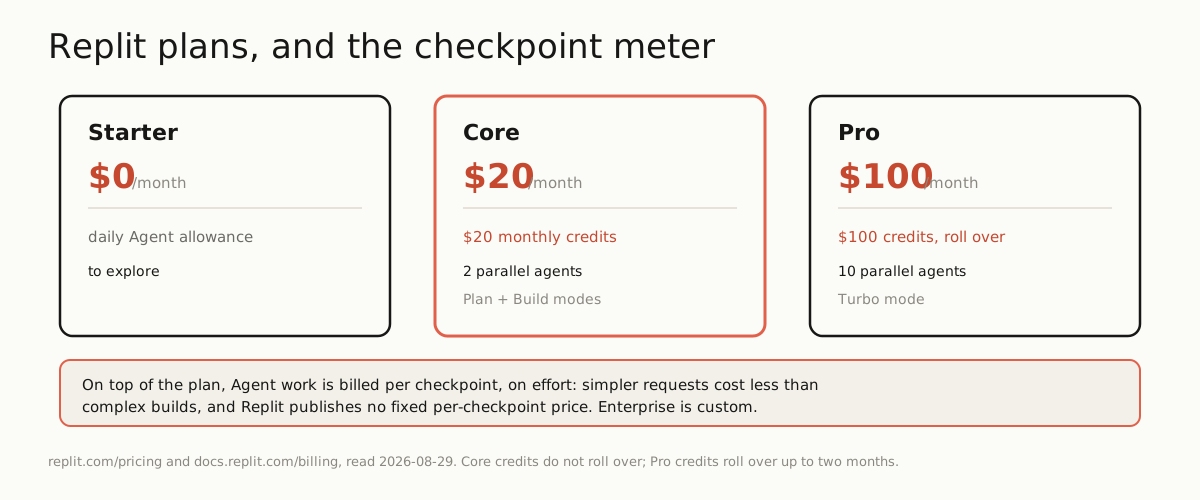
The subscription is only half the cost. Agent work is billed per checkpoint, on an effort basis: “a checkpoint occurs when Agent completes work on your request,” and simpler requests cost less than complex builds. Two things follow that matter. First, Replit does not publish a fixed dollar figure per checkpoint, so the cost of a given build is not a sticker you can read in advance. Second, third-party model usage (Claude, ChatGPT, Gemini) is billed at the provider’s public API rate, deducted from your Replit credits. Your monthly credit allowance covers the routine work (Core and Pro also get Free Mode, no-cost everyday Agent work whose limits reset every five hours), but a big or looping build draws down credits fast. This is the same meter-without-a-ceiling problem our cost study maps for model tokens: scope each request tightly, watch your balance, and treat a complex prompt as a spending decision, not a free wish.
Deploying and the built-in integrations
Hosting is part of the product, not a separate step. Replit offers four deployment types: Autoscale (the default, which adds servers under load and scales to zero when idle), Reserved VM (one dedicated server that never sleeps), Static (files only, no backend), and Scheduled (runs a command on a timer). Static is not compatible with Agent-built full-stack apps, so those go on Autoscale or Reserved VM. And the services an app needs are wired in: Replit Database is a managed PostgreSQL database, Replit Auth adds sign-in, App Storage holds files and assets, and Secrets encrypts your API keys. You can import from or export to GitHub, and connect third-party services like Stripe, though most connectors need a paid plan.
Replit Agent vs Bolt vs Lovable
The comparison everyone runs, stated as plain fact. All three turn a prompt into a real app; they differ in the environment, the stack, and the meter.
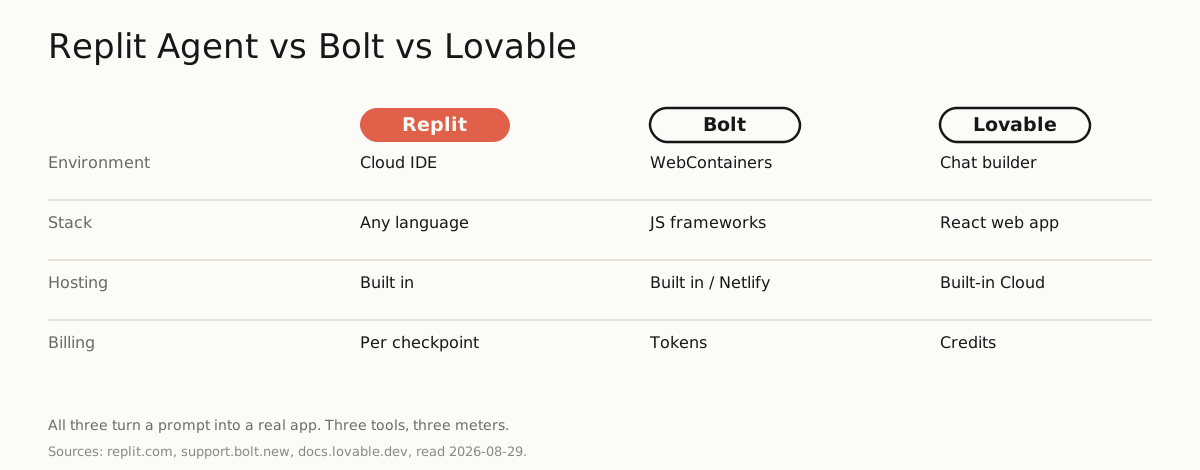
Replit Agent is the widest of the three: a full cloud IDE plus agent plus built-in hosting, it builds in any language, and it bills per checkpoint on effort. Bolt runs a development environment in your browser through WebContainers, builds across JavaScript frameworks, and bills by tokens. Lovable is a chat builder for web apps with a built-in Cloud backend, and bills by credits, roughly one per message in its planning mode. The pattern to notice is that all three meter differently, checkpoints, tokens, and credits, so a fair comparison is about which environment fits you and which meter you can predict. Pick Replit if you want the whole studio in one browser tab and a language other than JavaScript, and read the cost study before you lean on it, because an effort-billed agent rewards knowing what each prompt is likely to spend. The v0 guide and the from-scratch primer cover the neighbours.
One email, when there's something worth sending
Get the research in your inbox.
No fixed schedule, no filler. You get an email when we've tested something, run the numbers, or found a tool worth your time.
Free. Double opt-in, unsubscribe in one click.
What did the Agent meter run you? Get the research →
Sources
| Source | Link |
|---|---|
| Replit Agent overview (replit.com/products/agent and docs.replit.com/features/agent/overview, read 2026-08-29): Agent is Replit's AI app builder that turns an idea described in chat into a working app with no coding experience required; it runs in Replit's browser-based cloud IDE and takes action ("it sets up your project, creates applications, checks its work, and fixes problems"). Workflow: describe the idea, optionally use Plan mode for an ordered task list, Agent builds and tests, iterate in chat, then publish. | docs.replit.com ↗ |
| Agent vs Assistant (blog.replit.com/new-ai-assistant-announcement, read 2026-08-29): Replit frames its two AI tools as "If the Agent takes you 0 to 1, the Assistant takes you 1 to 10": Agent builds new apps end-to-end, the Assistant refines existing projects with quick edits, and they are designed to be used in tandem. | blog.replit.com ↗ |
| Languages and mobile (replit.com/blog/agent-on-any-framework and docs.replit.com/features/artifact-types/building-mobile-apps, read 2026-08-29): Agent can "Build with any language, framework, or stack" (the docs name Python, Java, Rust, Go, C#, Angular, Vue, and more) and can import an existing repo or start from a template (paraphrased); native mobile apps are built with React Native and previewed via Expo Go with guided App Store submission, done in Replit on the web. | replit.com ↗ |
| Replit pricing (replit.com/pricing and docs.replit.com/help/pricing-and-plans, read 2026-08-29): Starter is free with a daily Agent allowance; Core is $20/month (shown as $17/mo billed annually), with $20 of monthly model credits, Plan and Build modes, and 2 parallel agents; Pro is $100/month ($95/mo annually), with $100 of credits that roll over up to two months, Turbo mode, and 10 parallel agents; Enterprise is custom. Core credits do not roll over. There is no self-serve Teams plan. | replit.com ↗ |
| Agent billing and free allowance (docs.replit.com/billing/ai-billing and replit.com/blog/replit-introduces-free-mode, read 2026-08-29): Agent is billed per checkpoint, effort-based: "A checkpoint occurs when Agent completes work on your request," simpler requests cost less than complex builds, and third-party model API usage is billed at the provider's public rate from your Replit credits. No fixed per-checkpoint dollar figure is published. All subscribers get one-time free Agent checkpoints; Free Mode gives Core and Pro no-cost everyday Agent work whose limits reset every 5 hours. | docs.replit.com ↗ |
| Deployments and integrations (docs.replit.com/features/publishing/deployment-types and docs.replit.com/replitai/integrations, read 2026-08-29): hosting is built in as four deployment types: Autoscale (default, scales to zero when idle), Static (files only, not compatible with Agent-built full-stack apps), Reserved VM (a dedicated always-on server), and Scheduled; Agent wires up Replit Database (managed PostgreSQL), Replit Auth, Replit App Storage (object storage), and Secrets, plus GitHub import/export and third-party connectors like Stripe. | docs.replit.com ↗ |
| Comparison primaries (support.bolt.new/get-started/intro-bolt and docs.lovable.dev/introduction/plans-and-credits, read 2026-08-29): Bolt is by StackBlitz, runs on WebContainers (no local setup), builds full-stack JavaScript-framework apps, and prices on tokens; Lovable is credit-metered, one credit per message in Plan mode, and Build-mode cost depends on request complexity, with a free plan of 5 build credits a day. | support.bolt.new ↗ |