The Primer · Tools & Stacks
How to use Bolt.new: build an app from a prompt
Vendor-neutral
Bolt.new turns a prompt into a running full-stack app in your browser, with no local setup, because StackBlitz runs the whole dev environment in a browser tab. The thing to understand before you start is the meter: Bolt bills by tokens, with a real free daily allotment. Here is the whole thing, first build to owning the code, and how to make those tokens last.
Bolt.new is the fastest way to go from a sentence to a running app without installing anything. You type what you want into a box, and Bolt generates, runs, and lets you edit a full-stack web app right in your browser. That last part is the trick: Bolt is made by StackBlitz and runs on WebContainers, the technology that boots a whole development environment, including npm install and a dev server, inside your browser tab. For a vibe coder who wants to get an idea on screen in minutes, that is the appeal. The thing to understand before you start is the meter, because Bolt bills by tokens.
Here is the whole answer up front. Sign in, type a prompt, and click Build. Bolt scaffolds a JavaScript app you can preview and edit immediately, and connect to a database, GitHub, and a deploy target when you are ready. It runs on tokens, with a genuine free daily allotment, and most of the skill is spending those tokens well. Everything below is the how.
Start your first build
Go to bolt.new, sign in with Google, GitHub, or email (no credit card), and you are looking at a prompt box. Type what you want to build and click Build now. You do not have to start from a blank prompt: you can begin from uploaded files, a Figma or Google Stitch design, an imported GitHub repo, or a template. Bolt reads the prompt, sets up the project, and shows you a live preview within the same tab, which is the moment the browser-based approach earns its keep, since there was nothing to install first.
What you can build
Bolt is a JavaScript shop. It supports a Node.js backend and any JavaScript frontend framework, with React as the default and Vite and Next.js named in the docs. What it does not do is non-JavaScript backends: PHP and Python are not compatible, so a Django or Laravel app is out of scope. It runs best in a desktop Chromium browser or Safari, with a few features desktop-only. If your idea is a JavaScript web or mobile app, Bolt will build it; if it needs a Python backend, this is the wrong tool.
Tokens and pricing: what it actually costs
This is the most-searched thing about Bolt, and the part worth reading twice. Bolt bills by tokens, the unit it consumes as it reads, reasons about, and builds your project, and a per-conversation limit covers both your prompt and Bolt’s output. Because most token use comes from Bolt reading and syncing your project files, a bigger project costs more tokens per message, which is the dynamic that surprises people. Prices read from bolt.new/pricing on 15 August 2026:
- Free: $0 a month, with a 300,000-token daily limit and 1 million tokens a month, public and private projects, hosting, and Bolt branding on your sites. The daily limit is the one you will feel first.
- Pro: $25 a month, no daily limit, 10 million tokens a month, no branding, custom domains, and unused tokens roll over. Higher tiers scale the allotment: Pro 50 is 26M tokens for $50, Pro 100 is 55M for $100.
- Teams: $30 per member a month, adding centralized billing and admin controls.
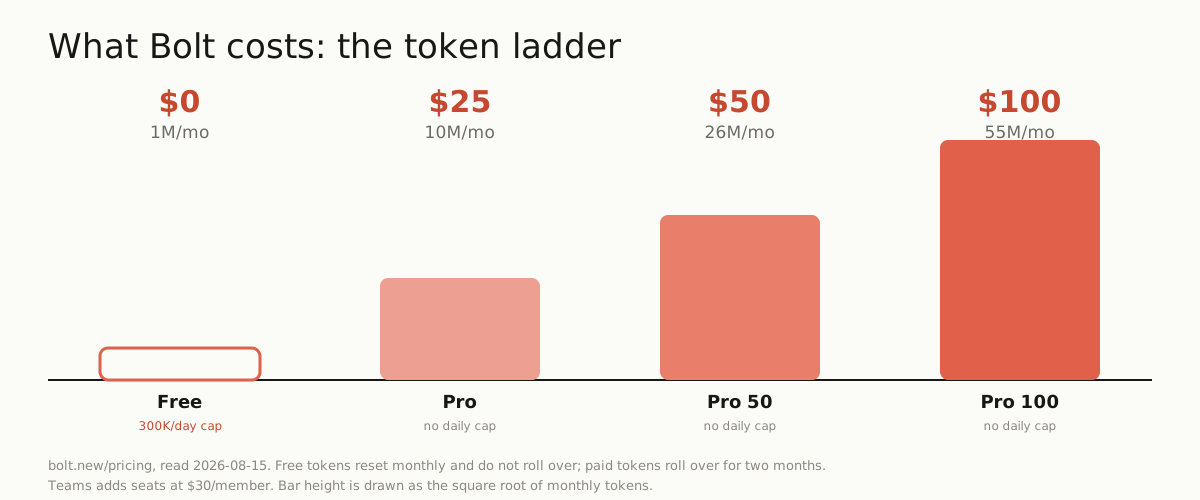
Two details that catch people: free tokens reset on the 1st of the month and do not roll over, while paid tokens reset on your renewal date and unused ones carry for two months. For reference, Bolt’s own quickstart tutorial uses just under the 300,000 daily free tokens, so the free tier is enough to learn on but tight for a real build.
Spend fewer tokens
Because tokens are the cost, the real skill is not burning them. Three moves from Bolt’s own best-practices docs. Use Plan Mode, which lets you plan and ask questions with full project context, and even web research, without generating any code, so it costs fewer tokens than building (though it is not free). Pick the right agent: the Standard agent handles average work at a lower token cost, and you save the Max agent for genuinely complex reasoning. And keep prompts specific and scoped to the file or function you mean, rather than turning Bolt loose on the whole codebase, since a broad prompt makes it read more and spend more. Restoring an earlier version through Version History and editing directly in Code View both cost no tokens at all, so lean on those for small fixes.
Databases, deploy, and owning your code
Bolt’s integrations are first-party and cover the parts an app needs. Supabase adds a hosted database, authentication, and edge functions (on Vite projects). GitHub syncs your project out of Bolt with automatic commits and two-way updates, checking for outside changes every thirty seconds, which is also how you get a real version history and a backup that lives outside the sandbox. For going live, Bolt now publishes every project to a free bolt.host address with built-in hosting by default, with custom domains on paid plans, and Netlify remains an option if you prefer it.
And you own the code, which is the question every builder asks. You can download the full project as a zip, or work through the GitHub sync and edit anywhere, or edit directly in Bolt’s Code View. Nothing traps your app inside Bolt, which matters, because the from-scratch primer is clear that the walls come after the demo, and getting your code out is how you get over them.
Build a mobile app
One feature worth knowing: Bolt builds mobile apps, not just websites. Include the words “mobile app” in your first prompt and Bolt generates an Expo (React Native) app that runs on iPhone and Android from the same code. You test it on your phone by scanning a QR code with Expo Go, and when it is ready you download the code and build for the App Store and Google Play through Expo’s EAS. It is the same prompt-to-preview loop, pointed at a native target.
Bolt or Lovable
The comparison everyone searches, and it comes down to environment and meter. Both Bolt and Lovable turn a prompt into real full-stack code you can sync to GitHub. Bolt runs a full development environment in your browser through WebContainers and is framework-flexible across JavaScript, and it bills by tokens. Lovable, which our Lovable guide covers, builds on a fixed React and Vite stack, and bills by credits.
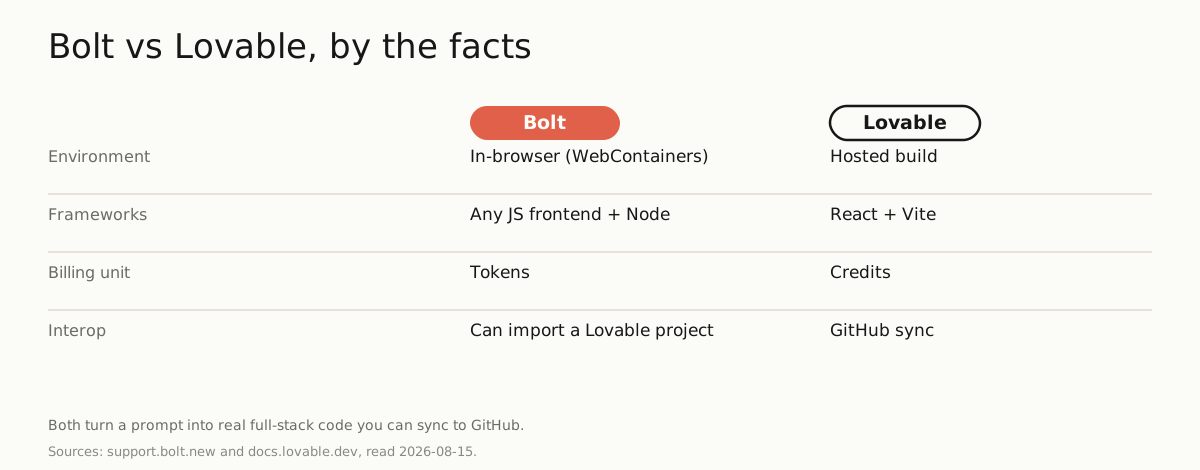 They are close enough that Bolt can import a Lovable project through GitHub, so the choice is which environment and pricing model fits you, not a wall between them. Pick Bolt if you want an in-browser dev environment and framework flexibility, start on the free daily tokens to learn the meter, and read our cost study before you scale, because a usage-billed builder rewards knowing exactly what each message spends.
One email, when there's something worth sending
Get the research in your inbox.
No fixed schedule, no filler. You get an email when we've tested something, run the numbers, or found a tool worth your time.
Free. Double opt-in, unsubscribe in one click.
How far did your tokens get you? Get the research →
Sources
| Source | Link |
|---|---|
| Bolt.new intro and quickstart (support.bolt.new/get-started/intro-bolt and /quickstart, read 2026-08-15): Bolt is an AI builder for websites, web apps, and mobile apps by StackBlitz; you describe an app in a prompt and it produces a working full-stack project, running in your browser with no local setup because it uses WebContainers. Sign in with Google, GitHub, or email, no credit card. | support.bolt.new ↗ |
| Bolt supported technologies (support.bolt.new/concepts/supported-technologies, read 2026-08-15): Bolt focuses on JavaScript, supporting a Node.js backend and any JavaScript frontend framework (React by default, Vite and Next.js named); non-JavaScript backends such as PHP or Python are not compatible. It runs on desktop Chromium browsers and Safari, with some features desktop-only. | support.bolt.new ↗ |
| Bolt tokens and pricing (bolt.new/pricing and support.bolt.new/account-and-subscription/tokens + /billing, read 2026-08-15): Bolt bills by tokens, the unit consumed as it reads, reasons about, and builds your project. Free is $0/mo with a 300,000-token daily limit and 1M tokens a month; Pro is $25/mo with no daily limit and 10M tokens a month (higher tiers: Pro 50 = 26M for $50, Pro 100 = 55M for $100), unused paid tokens roll over; Teams is $30 per member a month. Free tokens reset on the 1st and do not roll over. | bolt.new ↗ |
| Bolt token efficiency and Plan Mode (support.bolt.new/best-practices/plan-mode and /maximizing-token-efficiency, read 2026-08-15): Plan Mode lets you plan and ask questions with full project context (and web research) without generating code, which uses fewer tokens than Build Mode though not zero; you can pick a Standard agent (lower cost) or Max agent (harder tasks), and restoring via Version History or editing in Code View uses no tokens. | support.bolt.new ↗ |
| Bolt integrations: Supabase, GitHub, Expo (support.bolt.new/integrations/*, read 2026-08-15): Supabase adds a hosted database, auth, and edge functions (with Vite projects); GitHub syncs your project with automatic commits and two-way updates; and including "mobile app" in your first prompt builds an Expo (React Native) app you test with Expo Go and ship to the App Store and Google Play via EAS. | support.bolt.new ↗ |
| Bolt Cloud hosting (support.bolt.new/cloud/hosting/publish, read 2026-08-23): Bolt publishes every project to a free bolt.host address with built-in hosting as the default for new projects, with custom domains on paid plans and Netlify available as an alternative deploy target. | support.bolt.new ↗ |
| Bolt code ownership and Lovable comparison (support.bolt.new/integrations/git, /netlify, /lovable-import, and docs.lovable.dev, read 2026-08-15): you own the code, downloadable as a full project or synced to GitHub and editable in Code View; Bolt can import a Lovable project via GitHub. Both Bolt and Lovable are prompt-to-app platforms with real code and GitHub sync; Bolt runs a full in-browser dev environment and is framework-flexible, billing by tokens, while Lovable builds on a fixed React-and-Vite stack and bills by credits. | support.bolt.new ↗ |