The Primer · Tools & Stacks
How to use Aider: AI pair programming in your terminal
Vendor-neutral
Aider is an open-source AI pair programmer that lives in your terminal, commits every change to git so you can always undo it, and points at almost any model, including a free local one. Here is the whole thing: install, run it in a repo, the commands you will use, and how to wire it to Claude, to OpenRouter, or to Ollama running on your own machine for zero per-token cost.
Aider is the tool for people who want an AI coding agent that lives in the terminal, not in an editor, and who want to own the model it runs on. It describes itself in four words, “AI pair programming in your terminal”, and the two things that make it distinctive both follow from that: it commits every change it makes to git, so nothing it does is ever unrecoverable, and it connects to almost any model, including a free one running on your own machine. For a vibe coder who watches the meter and keeps their hands near git, that combination is the pitch.
Here is the whole answer up front. Install Aider with two commands, run aider inside a git repository, and it pair-programs with you, committing each edit as it goes so /undo can always walk it back. Point it at Claude or GPT if you want the strongest model, at OpenRouter if you want a free tier, or at Ollama if you want zero per-token cost on your own hardware. Everything below is the how, section by section.
Install it
From Aider’s own install docs, read 15 August 2026. The quick start is two commands:
python -m pip install aider-install
aider-install
aider-install also installs a separate Python 3.12 to run Aider with, so it does not disturb your project’s Python. If you prefer, there are three other supported paths: uv tool install --force --python python3.12 --with pip aider-chat@latest, a direct python -m pip install -U --upgrade-strategy only-if-needed aider-chat on Python 3.9 to 3.12, or pipx. Any of the four gets you the aider command.
Run it in your git repo
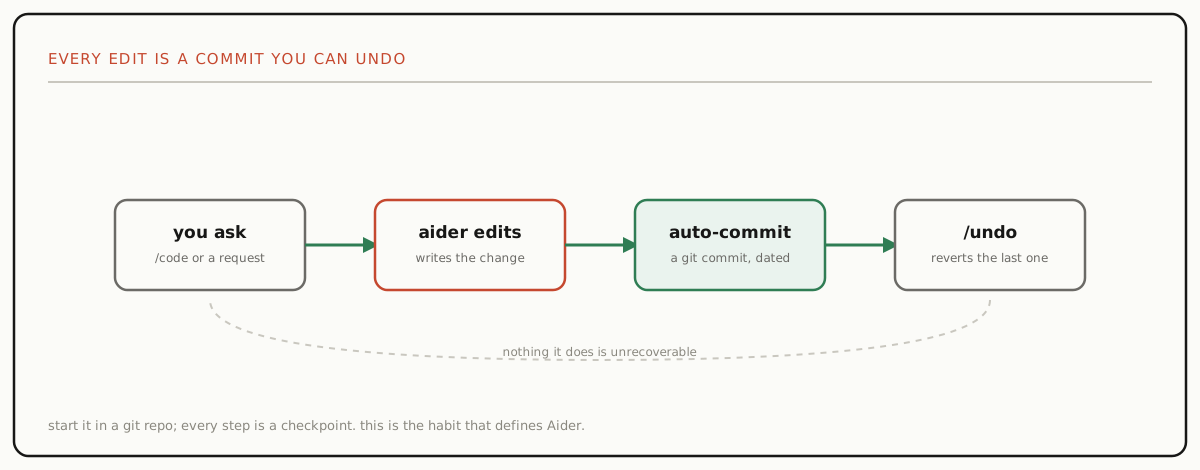
This is the habit that defines Aider. Start it inside a git repository, and Aider will git commit all of its changes, each with a sensible message, so you can diff, track, and undo them with the git tools you already use. That is not a safety feature bolted on; it is how the tool works. When the model does something you did not want, you type /undo, which the docs define exactly as “undo the last git commit if it was done by aider,” and you are back where you were.
If you are new to it, run aider in a small repo, ask it to make one change, and watch it commit. Seeing the commit appear is the moment Aider clicks, because it means every step is a checkpoint you can return to.
The commands you will actually use
Aider is driven by in-chat slash commands. From the command reference, the ones that carry most of the work:
/addputs files into the chat so Aider can edit them;/dropremoves them again./askasks a question about the code without editing it./coderequests a change;/architectruns the two-model workflow below./runruns a shell command and can feed the output back into the chat./diffshows what changed since your last message;/undoreverts the last Aider commit./modelswitches which model you are talking to mid-session;/commitcommits edits you made outside the chat.
You will spend most of your time in /add then plain requests, with /undo as your safety net and /run to let Aider see your test output.
Point it at any model
Aider is model-agnostic, and this is where it separates from a tool locked to one lab. Its own docs list the models it works best with, Claude, GPT (o3, o4-mini, GPT-4.1), Gemini 2.5, and DeepSeek, and note that it can connect to almost any LLM besides. You supply a key on the command line with --api-key anthropic=<key> or through an environment variable or .env file, and you are running.
Two paths matter for cost. OpenRouter aggregates many providers behind one key and offers free access to a number of models with daily-usage limits, which the docs call out directly, so it is a common way to try Aider without paying. And a hosted model is only one option, because the next section is the free one.
Run a local or free model
This is the most-searched thing about Aider, and the answer is clean. To run a local model through Ollama: set OLLAMA_API_BASE (it defaults to http://127.0.0.1:11434), pull your model and start the Ollama server, then run aider --model ollama_chat/<model>. That is a coding agent running against a model on your own laptop, with no per-token bill, the same zero-cost setup our Ollama guide walks through from the model side.
More broadly, Aider connects to any OpenAI-compatible endpoint: export OPENAI_API_BASE=<endpoint> and export OPENAI_API_KEY=<key>, then aider --model openai/<model-name>. That covers LM Studio, a self-hosted server, or any provider that speaks the OpenAI API. The trade with a local model is the familiar one, capability for cost and privacy, which our cost study frames in full; a strong 14B or 32B coding model is enough for a great deal of real work.

Architect mode: two models, one job
Aider has a distinctive mode worth knowing. In architect mode, an architect model proposes the changes and a separate editor model translates that proposal into specific file edits. The idea is to let a strong reasoning model plan while a fast, edit-reliable model does the mechanical writing. You enter it with /architect, or start Aider with --architect or --chat-mode architect. It is the one feature here that a single-model IDE agent cannot easily copy, and it pairs naturally with the model-mixing the agent field guide maps across the bring-your-own-model camp.
Configure it, and use it beside your editor
Two practical notes for daily use. Configuration lives in an .aider.conf.yml file in your home directory or your repo root, with AIDER_* environment variables and a .env file as alternatives, so you can set your default model and keys once and forget them.
And although Aider is a terminal tool, it works well beside a graphical editor through watch mode. Run aider --watch-files and it watches your repo for one-line “AI comments”: a comment ending in AI! tells Aider to make a change right there, and AI? asks it a question. So you stay in VS Code, drop an # fix this off-by-one AI! comment, and Aider acts on it, which is the closest thing to an inline experience without leaving the terminal running alongside. If you would rather the agent lived inside the editor, Cline is the editor-native counterpart with the same bring-your-own-model, run-it-local approach.
Is it free, and how good is it
Aider itself is free and open source under the Apache-2.0 license. The cost is the model: you pay the underlying API’s token bill unless you point Aider at a free tier like OpenRouter’s or a local model through Ollama, in which case running it costs nothing but your hardware. That is the whole economic story, and it is why Aider shows up so often in “how to code with AI for free” answers.
On capability, Aider publishes its own polyglot leaderboard, which tests models on 225 challenging Exercism exercises across C++, Go, Java, JavaScript, Python, and Rust. When we read it on 15 August 2026 the top entry was gpt-5 at high effort with 88.0% correct, and the useful thing is not that single number, which will move as models ship, but that the tool gives you a dated, reproducible way to pick the model you run it on. Start with aider in a small repo on whichever model you can afford, lean on /undo, and you will know within a session whether the terminal-and-git rhythm is yours.
One email, when there's something worth sending
Get the research in your inbox.
No fixed schedule, no filler. You get an email when we've tested something, run the numbers, or found a tool worth your time.
Free. Double opt-in, unsubscribe in one click.
What are you pairing with? Get the research →
Sources
| Source | Link |
|---|---|
| Aider homepage and README (aider.chat and github.com/Aider-AI/aider, read 2026-08-15): Aider is "AI pair programming in your terminal", a command-line tool to pair-program with LLMs on a new or existing codebase; it can connect to almost any LLM, including local models, and automatically commits each change with a sensible message so you can diff and undo with familiar git tools. | aider.chat ↗ |
| Aider install docs (aider.chat/docs/install.html, read 2026-08-15): quick start is python -m pip install aider-install then aider-install (which also installs a separate Python 3.12 to run Aider); alternatives are uv (uv tool install --force --python python3.12 --with pip aider-chat@latest), pip (python -m pip install -U --upgrade-strategy only-if-needed aider-chat, Python 3.9-3.12), or pipx. | aider.chat ↗ |
| Aider usage and in-chat commands (aider.chat/docs/usage.html and /usage/commands.html, read 2026-08-15): Aider works inside a git repo and "will git commit all of its changes"; the command reference defines /undo as "Undo the last git commit if it was done by aider", plus /add, /drop, /ask, /architect, /code, /run, /diff, /model, and /commit. | aider.chat ↗ |
| Aider model connection docs (aider.chat/docs/llms.html, /llms/ollama.html, /llms/openai-compat.html, read 2026-08-15): best-supported models include Claude, GPT (o3, o4-mini, GPT-4.1), Gemini 2.5, and DeepSeek; OpenRouter offers free access to many models with daily limits; for Ollama, set OLLAMA_API_BASE (default http://127.0.0.1:11434) and run aider --model ollama_chat/<model>; any OpenAI-compatible endpoint works via OPENAI_API_BASE + OPENAI_API_KEY and aider --model openai/<model-name>. | aider.chat ↗ |
| Aider modes, config, watch, license (aider.chat/docs/usage/modes.html, /docs/config.html, /docs/usage/watch.html, and the repo LICENSE.txt, read 2026-08-15): architect mode uses two models, an architect that proposes changes and an editor that makes the edits; config lives in .aider.conf.yml (home dir or repo root), AIDER_* env vars, and .env; --watch-files reacts to AI, AI!, and AI? code comments; Aider is Apache-2.0. | aider.chat ↗ |
| Aider polyglot leaderboard (aider.chat/docs/leaderboards, read 2026-08-15): tests models on 225 challenging Exercism exercises across C++, Go, Java, JavaScript, Python, and Rust; the top entry when we read it was gpt-5 (high) at 88.0% correct. Scores change as models ship, so treat any single number as a dated snapshot. | aider.chat ↗ |