The Primer · Tools & Stacks
Where Perplexity earns its keep, and where it doesn't
Vendor-neutral

Perplexity does the searching and the reading; the checking stays your job. A cited answer reads like a verified one and is not, and the tool pays for itself exactly as long as you keep clicking the footnotes.
Perplexity is an answer engine: it runs a live web search, reads the results, and hands you a written answer with numbered citations stitched into it. Ask Google a question and you get ten blue links to read yourself; ask a plain chatbot and you get a fluent paragraph with no idea where it came from. Perplexity sits in between, and it shows its work. That is the whole pitch, and for research it is a good one. The catch, and the reason this guide exists, is four words long: cited is not verified. A footnote next to a sentence is only a pointer, and the research on how often those pointers are wrong is the most important thing on this page.
The surfaces
Perplexity runs in a browser, in the iOS and Android apps, as a browser extension, inside its own Comet browser, and as the Sonar API to wire its search into your own product. Start free on the web. The free tier answers everyday questions, then gates you fast and locks the better tools to push you toward Pro. You do not need an account to see what it does; you need one to do real work in it.
The three depths, lightest first
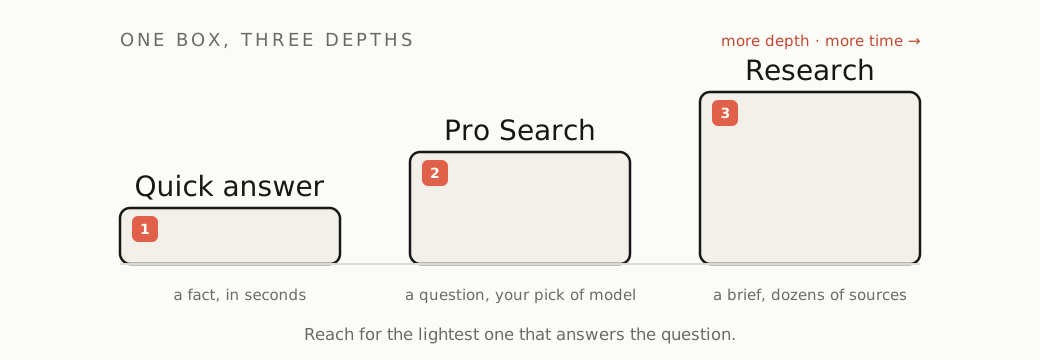
Perplexity has one box and three depths of effort behind it. Use the lightest that does the job.
- The quick answer. The default. Type a question, get a cited answer in a couple of seconds. Good for a fact, a definition, a “what is X,” a place to start.
- Pro Search. Perplexity describes it as “a knowledgeable search assistant” rather than a keyword search: it runs several searches, reasons across articles, papers, forums, and videos, and synthesizes a fuller answer. This is where paid users pick the model behind the answer (Perplexity’s own Sonar, or the latest from OpenAI, Anthropic, and Google), each tuned for different kinds of question. Reach for it when one search will not cover the question.
- Research mode (it used to be called Deep Research). Hand it a real question and it goes away for a few minutes, fires off dozens of searches, reads across many sources, and comes back with a structured, multi-section report. Use it for the work you would otherwise give an afternoon: a market scan, a literature pass, a “compare these six options” brief.
Two more controls worth knowing. Focus narrows where it looks (Web, Academic, and others); Academic is the one that matters most, because it swaps the SEO content farms for real sources. Spaces are workspaces that keep a project’s threads, files, and instructions together, so a week of research does not scatter across your history.
Drive it well
- Ask a full question. Perplexity is built to answer a real sentence. “Best CRM for a two-person agency under $50 a month” beats “crm small business.”
- Keep going in the same thread. An answer is the start of a conversation. Ask the follow-up in the same thread (“now narrow that to free tiers,” “why did you rule out the third one”) and it builds on what is already on screen, instead of making you restate the whole question.
- Set the focus before the source matters. If you need sources you can stand behind, switch to Academic. Our own testing found everyday Perplexity leaning on content mills, while Academic returned arxiv, SSRN, and Reuters. The full review is in The Proof.
- Pick the model for the job if you pay. Routing a reasoning-heavy question to a frontier model and a quick lookup to Sonar is the real lever the paid tiers give you.
- Open the citations. Every time. This is the habit that separates people who get value from Perplexity from people who get burned by it. The numbered sources are not decoration and not proof; they are the thing you came for. Click them. The next section is why.
Perplexity pricing: free, Pro, and Max
The free tier gives you cited answers, gated quickly, with the better tools locked. Pro, around $20 a month, adds model choice, far more Pro Search and Research, and the workspace features; it is the tier most daily users land on. Max, $200 a month, stacks the heavy toolset on top: a council of frontier models answering side by side, an agentic “Computer” that runs multi-step tasks, and premium data connectors. We bought Max and drove every tool: the advanced kit is genuinely powerful, and most people will never touch the parts that justify ten times the Pro price. The Proof has the full verdict.
Pro and Max run the same core search; Max buys the extra machinery, not a smarter everyday answer. Builders have a fourth option, the Sonar API, which puts Perplexity’s web search behind your own app, priced from about a dollar per million tokens plus a per-request search fee. One caution across all of it: Perplexity’s exact limits move often, and the allowances have tightened since launch, so check the current numbers in your own account before you build a habit, or a budget, on them. How often they move is its own story: we coded 1,024 subscriber posts and found three separate cuts to the Pro tier in eight months.
Is Perplexity accurate? A cited answer is not a verified one
Read this part twice. In March 2025 the Columbia Journalism Review’s Tow Center ran the cleanest test of AI search so far: they took real article excerpts and asked eight AI search engines to name the source. Across 1,600 queries, the engines were collectively wrong more than 60% of the time. Perplexity was the best of the eight, and it was still wrong 37% of the time. The most accurate AI search on the market misattributed the source of a quote in more than a third of its answers.
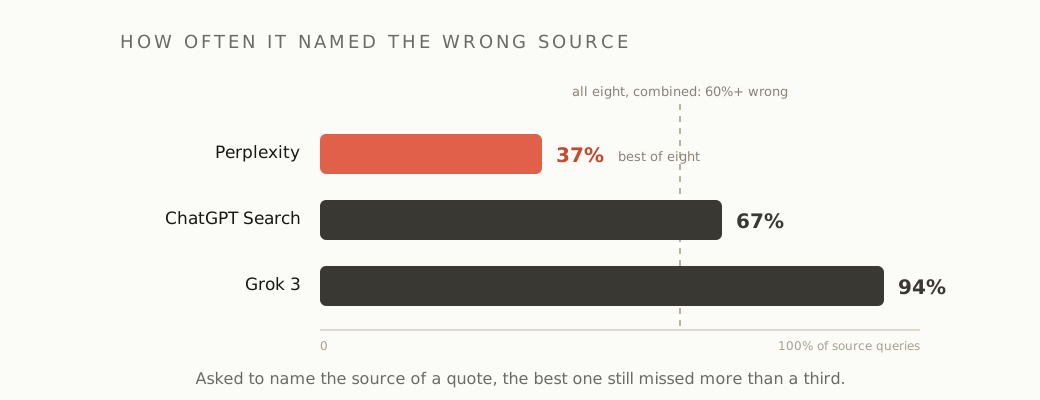
It gets sharper for the paid tiers, and this is the part that should change how you read what they hand back. The study found the premium versions, Perplexity Pro among them, were not more reliable. They were more confidently wrong: they handed back a definitive source instead of admitting they did not know, and that confidence pushed their error rate up. The authoritative tone of a paid Perplexity answer is not a signal that it is right.
Stack that on what our own testing found, Perplexity once citing a politics magazine for a claim about how a company bills, and the rule writes itself. Treat every Perplexity answer as a fast, well-organized first draft of the truth, with the sources you need to check it sitting right there. A citation you did not click is a vibe.
The second receipt: how the sources get collected
The first receipt is whether the citation is right. The second is where the citation came from at all. The same Tow Center study found Perplexity’s free tier correctly identifying ten excerpts from paywalled National Geographic articles, from a publisher that had blocked its crawler and had no deal with it. In August 2025 Cloudflare reported something pointier: when sites blocked Perplexity’s declared crawler, it observed undeclared “stealth” crawlers impersonating an ordinary Chrome browser and rotating through IP addresses to fetch the content anyway, including on brand-new test domains set up to block every bot. Perplexity disputes Cloudflare’s reading, so take it as a documented allegation rather than a closed case. But take it: the answer in front of you may rest on sources their owners tried to keep out, which is both an ethical question and a tell about how aggressively those citations are assembled.
Where it stops earning its keep
Perplexity is the right tool when you want a fast, cited synthesis of what the web says right now. It is the wrong tool here:
- You need the primary document. For a specific law, a filing, a spec, or a number that has to be exact, go to the source. A synthesis is a detour when you already know which page you need.
- The answer has to be airtight. Anything legal, medical, financial, or going in front of a client carries that one-in-three attribution risk. Use Perplexity to find the sources, then verify each one yourself, or start from a primary source you already trust.
- You want deep reasoning, coding, or long-form writing. Perplexity is tuned for fast cited search. For code, a terminal agent or an AI editor is the right tool instead; for a long reasoning or writing task, the frontier model Perplexity routes to does better work when you talk to it directly. The tools we currently stand behind are on the Palette.
- A plain search is faster. For a navigational lookup (“the React docs,” “that one pricing page”), Google still wins on speed.
The sweet spot, where Perplexity genuinely beats both Google and a sourceless chatbot: a fast scan of a topic you do not know yet, a “what is the current state of X,” comparison research before a purchase, and (in Academic focus) a first literature pass. There, the cited answer saves real time, as long as you do the one thing the tool is quietly hoping you will skip.
Perplexity earns its keep as a research accelerator that shows you its sources. It stops cold the moment you read the answer and trust the footnote instead of clicking it. Show your work cuts both ways: the point of seeing the sources is that you check them. Feeling like someone already did is the trap.
One email, when there's something worth sending
Get the research in your inbox.
No fixed schedule, no filler. You get an email when we've tested something, run the numbers, or found a tool worth your time.
Free. Double opt-in, unsubscribe in one click.
Researching with Perplexity? Get the research →
Sources
| Source | Link |
|---|---|
| Perplexity Help, What is Pro Search | perplexity.ai ↗ |
| Perplexity Help, What is Research mode | perplexity.ai ↗ |
| Perplexity blog, Introducing Deep Research (Feb 2025) | perplexity.ai ↗ |
| Perplexity Help, What are Spaces | perplexity.ai ↗ |
| Perplexity API pricing (Sonar) | docs.perplexity.ai ↗ |
| Columbia Journalism Review / Tow Center, AI Search Has a Citation Problem (March 2025) | cjr.org ↗ |
| Nieman Lab on the Tow Center citation study | niemanlab.org ↗ |
| Cloudflare, Perplexity is using stealth undeclared crawlers (Aug 2025) | blog.cloudflare.com ↗ |
| Finout, Perplexity pricing in 2026 | finout.io ↗ |