The Primer · Tools & Stacks
How to use OpenCode: the open-source terminal agent
Vendor-neutral
OpenCode is a free, open-source AI coding agent that runs in your terminal and points at almost any model, 75+ providers or a local one on your own machine. It is the model-agnostic, MIT-licensed answer to a terminal agent, and the two things worth knowing first are which OpenCode is the real one and how you connect a model. This is the whole thing, install to first edit, and what it does and does not cost.
OpenCode is an open-source AI coding agent that lives in your terminal, and its whole personality is one word: agnostic. It does not care which model you point it at, and it does not lock you into a subscription. You give it a task in a terminal window, and it reads your code, proposes edits, runs commands with your permission, and connects to whichever of 75-plus providers, or a local model, you prefer. It is free and MIT-licensed. For a builder who wants a capable terminal agent without a vendor deciding the model for them, that is the pitch.
Two things save confusion before you start. First, which OpenCode: the one this guide covers is made by Anomaly, the team behind the SST framework, and its repo is github.com/anomalyco/opencode (the older sst/opencode path redirects there). Other projects share the name and are unaffiliated. Second, the model: you bring your own, and the how is below. Here is the whole thing.
What OpenCode is, and who makes it
OpenCode calls itself “the open source AI coding agent,” and it is exactly that: an MIT-licensed agent you can read, fork, and run for free. It is built by Anomaly, the company behind SST, and while its main surface is a terminal TUI, it also ships a desktop app and an IDE extension. The license matters here for the same reason it does with Aider and Cline: an open agent is one you own, one that cannot be taken away or repriced out from under you, and one whose model choice is yours rather than the vendor’s.
Install it, and the client/server core
Getting started is one command. Install with curl -fsSL https://opencode.ai/install | bash, or npm i -g opencode-ai if you prefer, then run opencode inside a project directory. There is a design detail worth knowing, because it explains a lot of what OpenCode can do: it runs as a client and a server. Starting opencode launches a TUI (the client) that talks to a local server, and that split “lets opencode support multiple clients.” You can also run opencode serve to start a headless HTTP server with an OpenAPI endpoint, which is how you drive it programmatically or from another interface. Most of the time you just see the terminal; the architecture is why scripting and remote use are possible at all.
Bring your own model
This is the core of OpenCode, and its biggest advantage. It “uses the AI SDK and Models.dev to support 75+ LLM providers” and supports running local models, so the list of what you can point it at is deliberately enormous. Named providers include Anthropic, OpenAI, Google, OpenRouter, and GitHub Copilot, and for local inference it connects to Ollama and LM Studio, the same zero-per-token setup our Ollama guide walks through. You add credentials with the /connect command, and for a few providers you can log in with a subscription instead of a key (GitHub Copilot’s device login, or ChatGPT Plus/Pro).
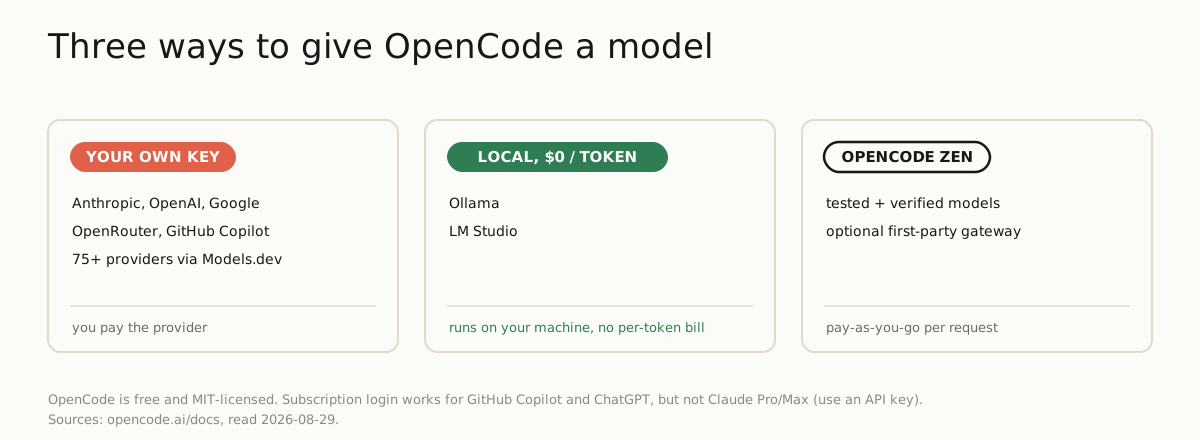
One caveat the docs are direct about, and worth repeating because people hit it: logging in with a Claude Pro or Max subscription is not officially supported. OpenCode’s own documentation notes that Anthropic prohibits the plugins that did this, and that OpenCode stopped bundling them as of version 1.3.0, so the supported way to use Anthropic’s models is an API key. That is not a knock on anyone; it is just the current state, and knowing it saves you an hour of trying the subscription path.
What it costs
The short version: the tool is free, the model is not. OpenCode itself is open source under MIT, with no required paid tier, and you pay whichever provider you connect at that provider’s rate, the same bring-your-own-key economics as Aider and Cline. The cheapest path is a local model, where the per-token cost is zero. There is one optional first-party product, OpenCode Zen, a gateway of models the team has tested and verified, billed pay-as-you-go per request; the docs are explicit that it is “completely optional and you don’t need to use it.” So your OpenCode bill is whatever you choose to spend on tokens, which is exactly the meter our cost study tells you to watch: pick the model deliberately, and a local one costs nothing but your hardware.
The features that matter
Underneath the simple terminal, OpenCode has the pieces a serious agent needs. It ships agents and modes: a Build agent with all tools enabled, a restricted Plan agent for thinking through a change without touching files, and subagents for focused work, switchable with the Tab key. It has built-in LSP integration with more than 24 language servers, so the agent sees the same diagnostics your editor does and can fix real errors. It supports MCP servers, local and remote, so you can extend it with external tools, the same discipline our MCP tax study applies: add what a task needs and leave the rest off. A permission system resolves each tool to allow, ask, or deny, so you decide what runs automatically. Sessions are private by default and shareable only when you run /share. And it works non-interactively: opencode run "..." lets you script it into a pipeline.
OpenCode vs Claude Code vs Aider
The comparison people search, stated as plain fact. All three are terminal AI coding agents; they differ in license, interface, and how you get a model.
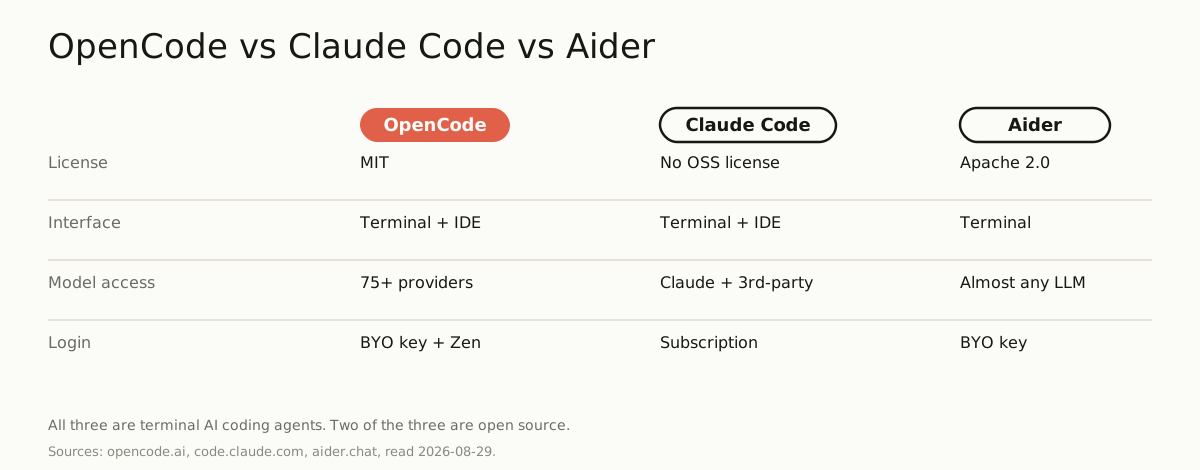
OpenCode is MIT open source, runs in the terminal (plus desktop and IDE), reaches 75-plus providers and local models, and you bring your own key. Claude Code is Anthropic’s own agent, available across terminal, IDE, desktop, and browser, where most surfaces run on a Claude subscription or an Anthropic Console account (its terminal and editor surfaces also support third-party providers), and its overview states no open-source license. Aider is Apache-2.0 open source, terminal-based and git-native, committing each change so you can undo with git, and it too connects to almost any model including local ones. The pattern to notice: two of the three are open source and let you run any model you like, and OpenCode is the one that pushes model-agnosticism furthest, 75-plus providers behind a single agent. Pick OpenCode if you want the widest model choice in an agent you own, start it on a local model to learn the loop for free, and read the cost study before you point it at a frontier API.
One email, when there's something worth sending
Get the research in your inbox.
No fixed schedule, no filler. You get an email when we've tested something, run the numbers, or found a tool worth your time.
Free. Double opt-in, unsubscribe in one click.
Which model do you run OpenCode on? Get the research →
Sources
| Source | Link |
|---|---|
| OpenCode overview and identity (opencode.ai/docs and github.com/anomalyco/opencode, read 2026-08-29): OpenCode is billed as "The open source AI coding agent," available as a terminal TUI, desktop app, or IDE extension. It is made by Anomaly, the company behind the SST framework; the canonical repo is github.com/anomalyco/opencode, and the older github.com/sst/opencode path redirects there. The README asks other projects using the "opencode" name to state they are not affiliated. | github.com ↗ |
| OpenCode license (raw.githubusercontent.com/sst/opencode/dev/LICENSE, read 2026-08-29): the MIT License ("MIT License", "Copyright (c) 2025 opencode"); the GitHub sidebar shows MIT. Not GPL or Apache. | raw.githubusercontent.com ↗ |
| Install and client/server core (opencode.ai/docs and /docs/server, read 2026-08-29): install with "curl -fsSL https://opencode.ai/install | bash" or "npm i -g opencode-ai", then run "opencode" in a project. Running opencode starts a TUI client plus a server ("This architecture lets opencode support multiple clients"); "opencode serve" runs a headless HTTP server exposing an OpenAPI endpoint. | opencode.ai ↗ |
| Models and providers (opencode.ai/docs/models and /docs/providers, read 2026-08-29): OpenCode "uses the AI SDK and Models.dev to support 75+ LLM providers" and "supports running local models"; named providers include Anthropic, OpenAI, Google, OpenRouter, and GitHub Copilot, with local models via Ollama and LM Studio; credentials are added with /connect. Some providers allow subscription login (GitHub Copilot device login, ChatGPT Plus/Pro), but the docs state that logging in with a Claude Pro/Max subscription is not officially supported and OpenCode stopped bundling those plugins as of 1.3.0, so you use Anthropic via an API key. | opencode.ai ↗ |
| Cost, Zen, and features (opencode.ai/docs, /docs/zen, /docs/agents, /docs/lsp, /docs/mcp-servers, /docs/permissions, /docs/share, read 2026-08-29): the tool is free and open-source and you bring your own provider key, with no required paid tier; OpenCode Zen is an explicitly optional first-party gateway of tested models, billed pay-as-you-go per request. Features: built-in agents (Build default, Plan restricted, plus subagents), LSP integration with 24+ language servers, local and remote MCP servers, an allow/ask/deny permission system, opt-in session sharing, and non-interactive use via "opencode run". | opencode.ai ↗ |
| Comparison primaries (code.claude.com/docs/en/overview and aider.chat + raw Aider LICENSE.txt, read 2026-08-29): Claude Code is Anthropic's agentic tool, available in the terminal, IDE, desktop app, and browser, where most surfaces require a Claude subscription or Anthropic Console account (the terminal CLI, VS Code, and JetBrains also support third-party providers), and the overview states no open-source license; Aider is "AI pair programming in your terminal," Apache-2.0 licensed, git-native (auto-commits each change), and connects to almost any LLM including local models. | code.claude.com ↗ |