The Proof · AI tool
Cursor Pro: we gave it $20 and a startup idea
- Who it's for
- Anyone who ships code most weeks, and anyone curious whether a $20 agent can carry a real build. It carried ours. Tinkerers can live on the free Hobby tier until they hit its walls; Pro+ and Ultra are for people whose own meter says so.
- Real cost
- Hobby is free (limited Agent and Tab). Pro is $20 per month ($16 billed annually). Pro+ is $60 for 3x usage, Ultra $200 for 20x. On-demand usage bills in arrears past the included quota and ships OFF by default. Across two full test sessions, one editor review and one SaaS build, we stayed on Pro with on-demand off and paid $0 beyond the subscription.
We handed Cursor a founder-style pitch and it shipped a working, named SaaS the same evening: a tracker for the exact unnumbered AI allowances our own reporting keeps exposing. It survived two curveballs and a cold ship check, all on the $20 plan. Worth it, with the two caveats the meter still will not show you.
What's good
- One founder-style prompt produced a working, named SaaS: Express plus a JSON store, 18 passing tests, seeded with real data, in a single run.
- It named the product itself. Ceiling, chosen from five candidates with a line of reasoning for each.
- Both curveballs landed clean: CSV import with a genuine bad-row report, then a freemium gate with a clearly-labeled demo checkout and no dark patterns, each shipping its own tests (20, then 23).
- The cold ship check passed from nothing: npm install then npm test, 23 of 23, zero vulnerabilities.
- The round-one fundamentals held: 3/3 codebase Q&A, a clean brownfield change, a real Composer-versus-Opus speed-and-care split, MCP, rules, and a self-closing cloud-agent plus Bugbot loop.
- The whole two-session build stayed on the $20 plan with on-demand billing off.
Where it breaks
- The usage page still shows no remaining-quota number. You find the ceiling by hitting it.
- Runs on Auto log literally "auto" in the ledger, even after the fact. You cannot audit which model did your work.
- The speed models cut corners quietly: in round one Composer waved through an impossible calendar date that Opus caught.
- Tab and Cmd+K are typing-native features our harness cannot drive, so we cover them from Cursor's own claims, and say so.
- What it built is a credible prototype, well short of a shippable product: single JSON file, single user, no auth, no real payments. Closing that gap is the founder's job.
How we tested
We stopped treating Cursor like a lab specimen and treated it like a hire. We gave Pro one prompt, the kind a founder types at 9pm, and asked for a whole product: build a SaaS that tracks AI subscriptions and their usage allowances, warns you before you overflow, and watches the tools that publish no ceiling at all. We picked that product on purpose. It is the antidote to the exact problem our own reporting keeps finding, most recently in Perplexity’s shrinking $20 plan and in Cursor’s own meter. Then we threw two curveballs at the agent, a data one and a money one, and ran a cold ship check at the end. Every claim the agent made was gated by builds and tests we ran ourselves, outside Cursor.
One disclosure carries over from our first Cursor review: most of the driving went through Cursor’s own automation, the cursor-agent CLI and the cloud-agent surface at cursor.com. That is a real way to use the product, and it means two keyboard-native features, Tab and Cmd+K, were never exercised by our hands. Cursor advertises “unlimited Tab completions” on Pro; we report that as their claim and everything below as our own receipts.
Act one: the pitch, and the name
We asked for the whole thing in one message: the tracker, per-tool cost-per-unit and burn rate, projected overflow, a keep/downgrade/watch verdict, a “watch mode” for tools with no published ceiling, a price-change log, real seed data, plain JavaScript on Node 22, a local JSON store, tests, and, as a throwaway line, “propose five product names, pick the best one, and use it.”
It picked Ceiling. Its reasoning, unprompted: the name captures both the allowance you are trying to stay under and the watch-mode case where there is no ceiling to name. The runners-up were Burnrate, UnitCost, Allot, and KeepWatch. Then it built the thing: an Express app on port 5599, a JSON file store, eighteen real tests covering the projection and overflow math, and demo data seeded with the three tools most of our readers pay for, including Perplexity’s real 2026 price cuts logged as history. It even pinned a fixed “today” so the demo is deterministic. One prompt in, npm install && npm run dev, and this was on screen:
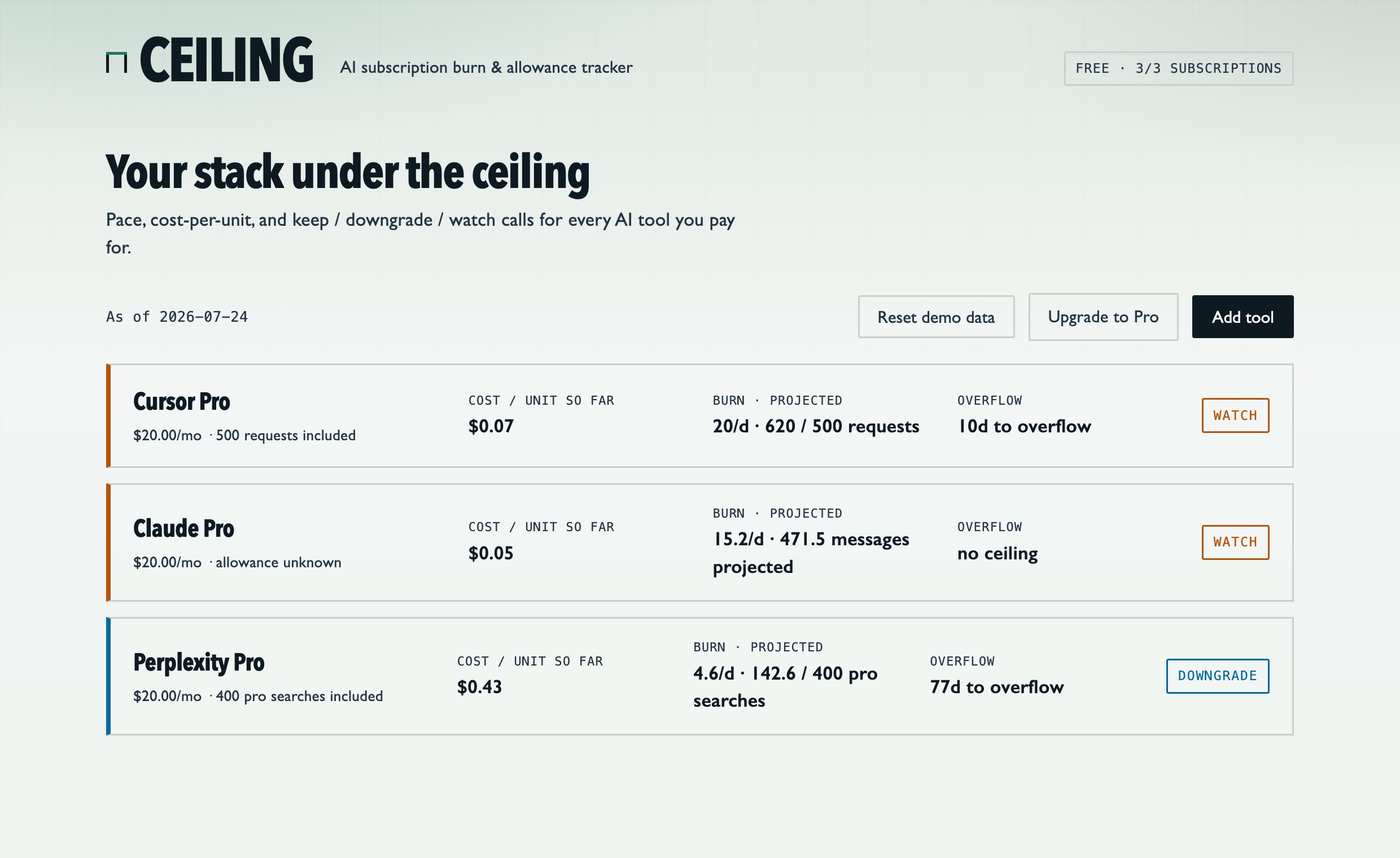
Look at what it inferred without being told. Cursor Pro, seeded at 300 requests by day 15, projects to 620 against a 500 allowance and gets tagged watch, ten days to overflow. Claude Pro, allowance unknown, shows no ceiling and rides watch mode. Perplexity Pro, under-using its 400 searches, gets a downgrade nudge. That is the whole product thesis, working, from a paragraph of English.
The tool page reads the room
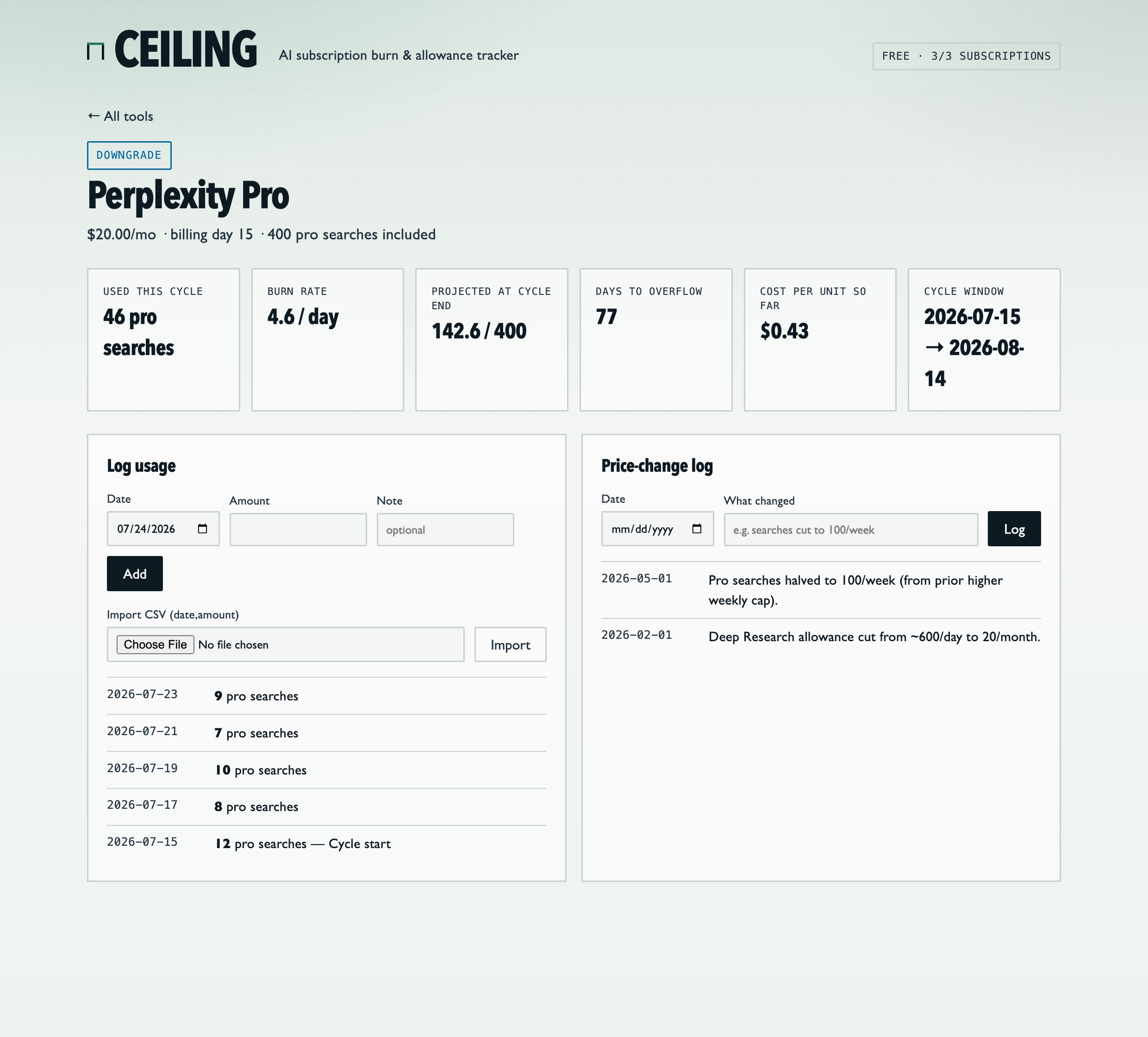
Open a subscription and the price-change log is the part that matters, because it is the receipt for why this app should exist. Ceiling seeded Perplexity’s real history straight from our reporting: the February 2026 Deep Research cut from about 600 a day to 20 a month, and the May 2026 halving of pro searches to 100 a week. This is the tool built to catch the thing the tools keep doing.
Curveball one: the data
New request, the kind a real first user makes: “let me import my usage instead of typing every entry.” We asked for CSV import that skips bad rows and reports them instead of crashing. It added a date,amount importer that applies the good rows, and returns a per-row report of exactly which lines failed and why: wrong column count, bad date, negative or non-numeric amount. It shipped a test that feeds a file mixing good rows with three distinct kinds of bad ones and asserts both halves. The suite went from eighteen to twenty, still green. The endpoint recomputes every projection on import. No crash on garbage, which is the entire point of the feature.
Curveball two: the money
This is the one our readers came for. We asked it to make Ceiling freemium without dark patterns: a three-subscription free cap stated up front, a server-side gate on the fourth, and a demo checkout that is clearly labeled and charges nothing. It delivered all three, and the labeling held up:
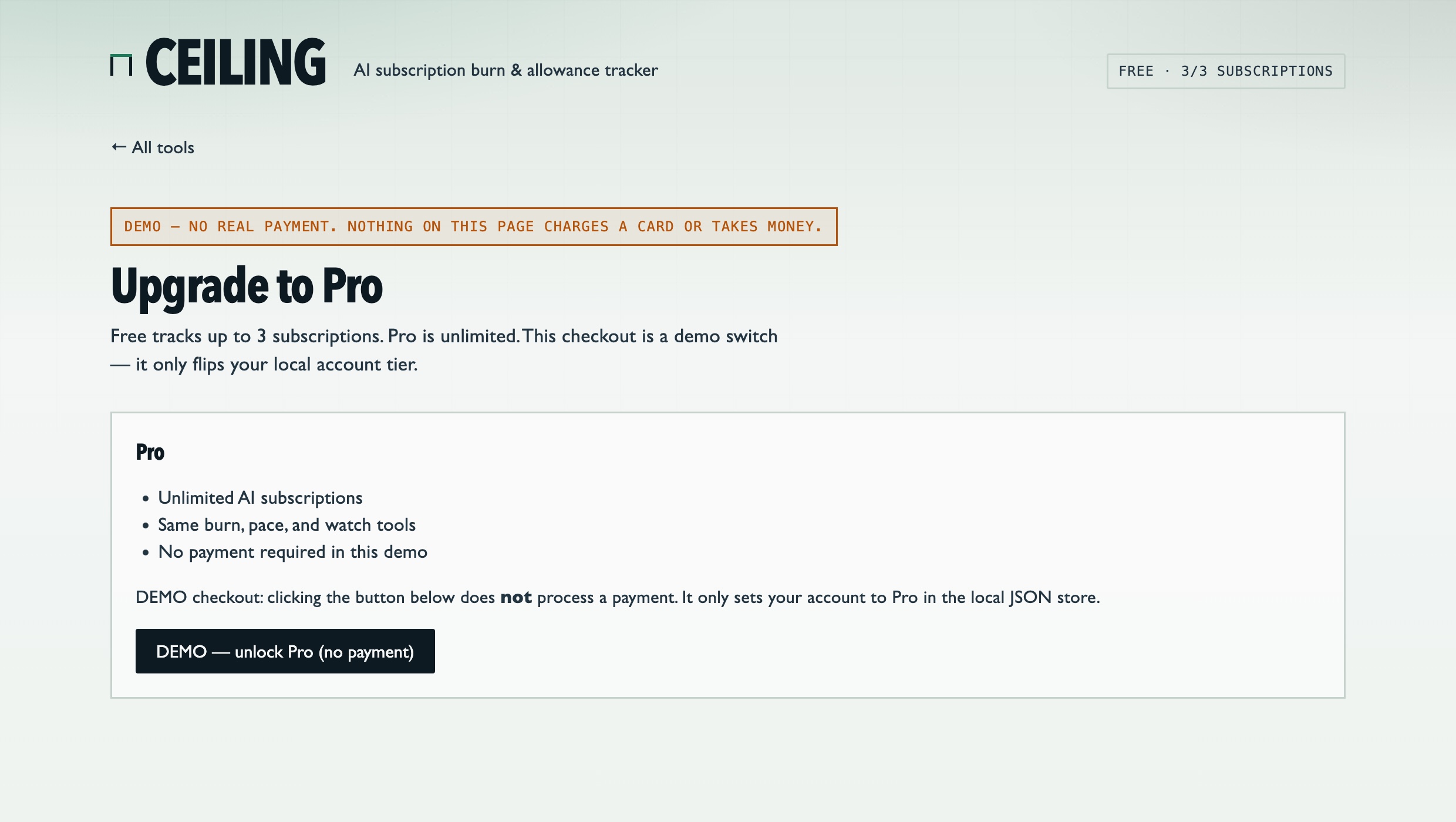
The free limit is printed on the add-subscription form, not sprung at submit time. The fourth add is rejected server-side with a clear message and an upgrade link. The checkout page says “DEMO, no real payment” on the banner, in the body, and on the button, with no fake card fields anywhere. Clicking it flips a tier flag in the JSON store and removes the three-tool cap. It even seeded exactly three subscriptions so the paywall shows on the first load. Three more tests, now twenty-three, all passing. Ask a coding agent to wire up monetization and the risk is a dark pattern or a fake Stripe form; we got the shape of a business model with the guardrails on.
The ship check
We copied the source to a clean directory with no dependencies and ran the cold-start a stranger would: npm install, then npm test. Install pulled 68 packages with zero vulnerabilities; the suite came back 23 of 23. The thing runs from nothing.
Now the founder’s-gap list, because “worth it” has to be straight about the ceiling. What Ceiling is not, yet: it is a single-user app on a single JSON file with no accounts, no real authentication, no real payments, and no deployment. Those are not agent failures; they are the four hard problems a $20 prompt does not solve for you. Cursor got us a credible, tested prototype in an evening. Turning it into a company is still the part with your name on it.
The lab notes
Beyond the build, the fundamentals from our full protocol held. Codebase question-and-answer went 3 for 3 against ground truth we knew cold, with correct file citations. A brownfield agent task on this site’s real repo shipped clean: build passing, house conventions kept, existing code extended instead of duplicated. A same-task Composer-versus-Opus run split exactly where the models differ: Composer 1.8x faster and spec-correct, Opus slower but catching an edge case Composer missed. Our own MCP server connected and its tools were called correctly off one nudge. A two-line project rule was obeyed in the exact spot models usually break it. And the cloud loop closed itself end to end:

The model roster behind all of it is the real Pro upgrade: three frontier labs plus Cursor’s own two, switchable per request.

Where it leaks
The leaks are informational, and they rhyme with what we documented on Perplexity Pro, which is why Ceiling exists. First: Pro’s included usage still has no published number. The page says “usage limits for everyday use,” and the ledger stamps every request “Included” without ever showing what remains. Two full sessions of building cost nothing beyond the subscription, which is genuinely generous, and also unbudgetable. Second: runs on Auto are logged as “auto” forever, so the model that did your work is never disclosed, which matters exactly as much as the Composer-versus-Opus gap says it does. Third, smaller: the speed models’ corner-cutting is quiet, and nothing in the UI flags which corners.

Real cost
Hobby is free and capped. Pro is $20 a month ($16 annually) and carried everything in both of our reviews: the frontier roster, the agent, the CLI, a cloud agent, a Bugbot review, and now a full SaaS build with two curveballs and a ship check, all with on-demand billing off and $0 charged past the subscription. Pro+ ($60) and Ultra ($200) are the same product with 3x and 20x the unnumbered allowance. Because the quota has no published figure, the only budgeting method that works is the one we used: watch your own meter for a week and let it tell you which tier you are. Ours never showed an on-demand charge.
The verdict
Worth it. We asked a $20 subscription to be a founding engineer for one evening and it was: it named the product, built it, tested it, took two curveballs including the one about money, and survived a cold start. That is a real answer to “can I build with this,” and the answer is yes, up to the four hard problems no prompt solves for you.
Keep both caveats in your pocket. You are buying an allowance nobody will quantify, from the same industry that taught us how quietly allowances shrink, and an Auto mode that will not tell you who answered. Pick named models for the code you care about, glance at the meter weekly, and Cursor Pro is the easiest recommendation in this category right now. The startup it hands you is up to you.
One email, when there's something worth sending
Get the research in your inbox.
No fixed schedule, no filler. You get an email when we've tested something, run the numbers, or found a tool worth your time.
Free. Double opt-in, unsubscribe in one click.
Building on the $20 plan yourself? Get the research →
Sources
Every outside quote in this review was re-fetched from its source before we used it.
| Source | Link |
|---|---|
| Cursor pricing page (tiers and included-usage language, captured 2026-07-22) | cursor.com ↗ |
| Cursor docs: Cloud Agents | cursor.com ↗ |
| Cursor docs: Bugbot | cursor.com ↗ |
| Cursor CLI (cursor-agent) | cursor.com ↗ |
| Okane Land, Perplexity Pro limits: the shrinking $20 plan (the unnumbered-quota pattern the SaaS is built to track) | okaneland.com ↗ |