# Okane Land, full text for agents
> Every published piece, concatenated as markdown. Index and structure: https://okaneland.com/llms.txt
---
# The economics of a one-person AI business: what the MRR screenshots leave out
Section: The Ledger
URL: https://okaneland.com/ledger/economics-of-a-one-person-ai-business/
The MRR screenshot is the most shared number in indie AI and the least useful. What the research says about gross margins, churn, fees, and what a solo founder actually keeps.
Open any indie maker feed and you find the same image: a revenue dashboard, a green line going up, an MRR number circled in red. It is the most shared number in indie AI, and the least useful one. Revenue is what a customer pays. Income is what you keep after the model bill, the card fees, the refunds, the tax you are holding, and the customers who quietly leave. Those are very different numbers, and the gap between them is wider for an AI product than for almost anything else you could build.
Here is what the research actually says about the economics of a one-person AI business, and where the screenshots stop telling the truth.
## Almost nobody gets the screenshot
Start with the survivor problem, because it shapes everything else. When Scraping Fish pulled every Indie Hackers product with Stripe-verified revenue in 2022, all 937 of them, [more than half were making nothing at all, and only about 5% cleared roughly $100,000 a year](https://scrapingfish.com/blog/indie-hackers-revenue), a level its author notes is "not that hard to earn as a software engineer in a full time job." The conclusion was blunt: "success in the world of indie developers is an outlier business."
Now compare that to the rooms where the screenshots come from. At MicroConf in 2025, a bootstrapper conference, founder Rob Walling reported that [28% of attendees were doing more than $100,000 in monthly recurring revenue](https://www.linkedin.com/posts/robwalling_the-state-of-bootstrapped-saas-in-2025-is-activity-7315372913732329473-obpo). That is not a contradiction, it is selection: one number is the whole population, the other is the people who already won and bought a conference ticket. Watch the units too. MicroConf's 28% is $100k a month. The Indie Hackers 5% is $100k a year.
The base rates are sobering even outside software. U.S. government data finds [about 34.7% of business establishments born in 2013 were still operating ten years later](https://www.bls.gov/opub/ted/2024/34-7-percent-of-business-establishments-born-in-2013-were-still-operating-in-2023.htm), and roughly half survive five years. AI has made the first dollar faster: [Stripe Atlas reports its 2025 cohort reached first payment in a median of 34 days, down from 38, with 20% charging a customer inside 30 days versus 8% in 2020](https://stripe.com/blog/stripe-atlas-startups-in-2025-year-in-review). But getting to the first dollar quickly is not the same as reaching a number worth screenshotting.
## The margin you do not have
Here is the part most pricing advice skips: an AI product is not an 80-percent-gross-margin SaaS business, and pretending it is will quietly bankrupt you.
Classic software is cheap to serve. Bessemer's cloud benchmarks put [the best SaaS gross margins at 80% and above](https://www.bvp.com/atlas/scaling-to-100-million), with a typical cloud business around 65 to 70%. AI is structurally lower. Andreessen Horowitz flagged this early. Its 2020 essay on [the new business of AI](https://a16z.com/the-new-business-of-ai-and-how-its-different-from-traditional-software/) pegged AI gross margins "often in the 50-60% range," dragged down by the "25% or more of revenue" that goes to cloud and compute. Six years on, the gap has narrowed but not closed: ICONIQ's [2026 State of AI snapshot](https://www.iconiq.com/growth/reports/2026-state-of-ai-bi-annual-snapshot) reports average AI product gross margins of 41% in 2024, 45% in 2025, and a self-projected 52% in 2026, still well under the 70 to 80% a mature SaaS business takes for granted.
The reason is simple and it does not go away: your cost of goods is metered. Every query a user runs costs you tokens. SaaS hosting amortizes toward zero as you scale; inference does the opposite. ICONIQ finds [model inference rising from 20% of AI product spend before launch to 23% at the scaling stage](https://www.iconiq.com/growth/reports/2026-state-of-ai-bi-annual-snapshot), becoming, in its words, "the dominant cost driver at scale." Bessemer's 2025 taxonomy makes the danger concrete: its usage-heavy "Supernova" companies run at [about 25% gross margin, often negative](https://www.bvp.com/atlas/the-state-of-ai-2025), against roughly 60% for the more disciplined "Shooting Stars."
This is the trap a flat monthly fee walks straight into. If you charge $20 a month and a power user burns $25 of tokens, you are paying them to use your product. a16z's own partners note that [the heaviest sliver of users drives a wildly disproportionate share of cost](https://a16z.com/questioning-margins-is-a-boring-cliche/), and that rate limits on the top 5% cut spend "with limited revenue impact." A flat fee on a metered cost is only safe if you cap the tail.
## The tailwind: token prices are collapsing
The counterforce is real, and it is the best news in this whole piece. The price of a fixed amount of AI capability is falling faster than almost any input cost in business history. a16z calls it [LLMflation](https://a16z.com/llmflation-llm-inference-cost/): the cost to reach GPT-3-level quality fell from $60 per million tokens in late 2021 to $0.06 by late 2024, roughly 10x a year. Independent analysis from Epoch AI, across six benchmarks, [puts the median decline at about 50x per year](https://epoch.ai/data-insights/llm-inference-price-trends), accelerating to roughly 200x per year for data since January 2024.
So if your feature set holds still, the same product gets cheaper to serve every quarter. That is genuinely on your side. The catch is the asterisk every careful read includes: those declines are for a fixed capability, and founders almost never hold capability fixed. You add the smarter model, the longer context, the agent loop, and your per-user cost climbs right back up while the screenshot stays the same size. Falling prices help. They do not hand you SaaS margins.
## The leaky bucket nobody photographs
Now the part that turns a good month into a bad year: churn, and it is worst exactly where solo products live.
Cheap, self-serve products churn hard. ChartMogul's benchmarks put [median monthly customer churn at 6.1% for products under $25 a month, against 2.2% above $500](https://chartmogul.com/blog/good-customer-churn-rate/). At 6.1% a month, you lose roughly half your customers in a year before you have sold anyone new. The AI-native numbers are worse: ChartMogul's 2025 retention study found [products priced under $50 a month keeping just 23% of gross revenue and 32% net, about 20 points below comparable SaaS](https://chartmogul.com/reports/saas-retention-the-ai-churn-wave/).
The escape hatch that rescues real SaaS, expansion revenue where existing customers pay you more so growth outruns churn, is mostly closed to you down here. Even [the top quartile of products under $25 a month retains only 64.7% of customers](https://chartmogul.com/blog/good-customer-churn-rate/), meaning even the best performers at the bottom of the market lose a third of their base every year. A one-person AI business at a low price is running up a down escalator: every month starts with a hole to refill before any growth counts.
## Revenue minus the cuts the screenshot hides
Even the revenue you do collect is not the revenue you keep. Walk the gap MRR never shows:
- **Card fees.** Stripe's standard rate is [2.9% plus 30 cents domestically, climbing to as much as 5.4% plus 30 cents on an international card that needs currency conversion](https://stripe.com/pricing). Sell globally, as most digital products do, and a real slice of every sale is gone before anything else touches it.
- **Refunds.** When you refund a customer, [Stripe returns their money but keeps the original processing fee](https://support.stripe.com/questions/understanding-fees-for-refunded-payments). The sale reverses; the fee does not.
- **Disputes.** A chargeback costs you [a $15 fee you only get back if you win](https://stripe.com/pricing), on top of the lost sale. On a $20 subscription, one dispute can erase the margin on a dozen other customers.
- **Payments that silently fail.** Cards expire and decline. Paddle (ProfitWell) estimates [involuntary churn is 20 to 40% of all churn](https://www.paddle.com/resources/reduce-voluntary-and-involuntary-churn), and Baremetrics' own data points to [around 9% of MRR lost to failed payments](https://baremetrics.com/blog/recover-failed-payments-save-lost-revenue). Without dunning, that is revenue you "earned" that never arrives.
- **Tax you owe.** Sales tax and VAT ride on top of the price but are a liability, not income. The EU's average standard VAT is [21.9%](https://taxfoundation.org/data/all/eu/value-added-tax-vat-rates-europe/), and on digital sales a seller outside the EU owes it from the first euro. That money flows through your dashboard and right back out.
## The screenshot, minus everything
Put it together and the circled MRR number is doing a lot of lying by omission. Take a $30,000-a-month screenshot at face value, then subtract a 50% gross margin, the card-fee haircut, the slice lost to failed payments and refunds, the tax you are holding for a government, and the fact that you are the 1-in-20 outlier the screenshot never mentions. What you keep is a different, smaller, and far more real number. [Run your own numbers through it](/study/keep/) and watch the gap open up.
That is not a reason to skip the AI product. Most of those leaks are levers you control, and the same research that makes the picture sobering also points straight at what grows the number you keep.
## What actually moves your income
- **Charge more, do not just sell more.** This is the biggest lever in the whole piece, and the data is one-sided. Under $25 a month you churn at 6.1%, and an AI product under $50 keeps just 23% of its revenue; over $250 a month, retention jumps to 70%. A higher price buys you a customer who stays and a margin that survives the token bill. For most solo AI products the move is up-market, not more users. How you land on the number is its own craft: see [pricing psychology that holds up](/ledger/pricing-psychology-that-holds-up/) and [what to charge for AI work](/ledger/pricing-ai-work/).
- **Recover the income you already earned.** Involuntary churn is 20 to 40% of all churn, and roughly 9% of MRR can fail to collect from expired and declined cards. Dunning, the automated retries and card-update nudges, claws that back with zero new customers. It is the cheapest income you will ever add.
- **Protect the margin so revenue becomes income.** Cap or meter the heavy tail so a handful of power users cannot turn a profitable plan into a loss, and route each job to the cheapest model that can actually do it. With inference prices falling roughly 50x a year, the model that was too expensive last quarter is often fine now.
- **Sell where retention lives.** The retention gap is not random: higher-value and business buyers stay far longer than cheap consumer subscriptions. Choosing who you sell to, and positioning for it, is an income decision as much as a marketing one.
Revenue is a vanity number. The levers that actually move income are charging enough to escape the churn cliff, plugging the leaks you already pay for, protecting the margin the tokens keep eating, and selling to buyers who stay. Build for what you keep, then go make more of it. When you have [run this math on your own numbers](/study/keep/), the [community](https://community.okaneland.com) is where people compare the number they actually kept.
---
# Pricing your AI app: the psychology that holds up, and the tricks that fall apart
Section: The Ledger
URL: https://okaneland.com/ledger/pricing-psychology-that-holds-up/
You shipped the thing. Now what number goes on it? The pricing research with real evidence behind it, the famous tactics that collapse on replication, and how to tell them apart when you price your own AI product.
You built the app. The model behaves, the deploy is green, and one box is still empty: the price. For most vibe coders it is the scariest field on the page, and the internet is glad to help, with a firehose of pricing hacks. End every price in 7. Bolt on a countdown timer. Charm-price it at .99 and watch sales climb. Most of that is folklore, copied from one course to the next with nothing under it. A little of it is real, replicated science. This is how to tell the two apart, with the studies attached, written for pricing your own AI product.
One rule before the list. Every effect below has an edge where it stops working or turns on you. The gurus sell you the effect. The money is in knowing the edge.
## Free is a different number than cheap
The most reliable finding in pricing is that $0 is not a low price. It behaves like its own category. In a [field study at MIT](https://pubsonline.informs.org/doi/10.1287/mksc.1060.0254), Shampanier, Mazar and Ariely offered Hershey's Kisses at 1 cent next to Lindt truffles at 15 cents, and among people who bought, 73% paid up for the nicer Lindt. Then the researchers cut both prices by a single cent. The Kiss was now free, the Lindt 14 cents, the gap unchanged. The room flipped: 69% now grabbed the free Kiss. A one-cent move reversed the whole decision, because "free" reads as a reward, not just a smaller cost.
That is why every AI product you admire opens with a $0 tier. [ChatGPT](https://openai.com/chatgpt/pricing/) shows Free beside Plus at $20 and Pro at $200. [Claude](https://claude.com/pricing) and [GitHub Copilot](https://github.com/features/copilot/plans) run the same free-to-paid ladder. The $0 plan is the magnet, and a sliver of those users later pay.
Free is not a cheat code, though. When the free thing carries a quiet cost (a credit card up front, a long signup, handing over your data), that "free" reads as a trap and can sell worse than a small, clean price. And every free user burns real inference money. So set your entry tier to exactly $0, not $1, because the jump in signups from $1 to free is far bigger than from $3 to $1, then cap it hard with rate limits and a smaller model, and convert on usage. If your free-to-paid rate sits between about 2 and 5%, that is the normal freemium range, not a leak to plug.
## A price is a quality signal, so stop racing to the bottom
Buyers cannot fully judge an AI tool before they use it, so they read the price as a clue to how good it is. And it runs deeper than belief. In a [now-classic experiment](https://journals.sagepub.com/doi/10.1509/jmkr.2005.42.4.383), Shiv, Carmon and Ariely gave people an energy drink and a set of word puzzles. Same drink for everyone, but one group was told it cost full price and another that it was discounted. The discount group solved fewer puzzles. They did not merely believe the cheaper drink was weaker, they performed as if it were, and nobody in the study consciously connected the price to their score.
The lesson for an AI app: a too-cheap price actively signals "low quality." [Superhuman](https://newsletter.pricingsaas.com/p/inside-superhumans-pricing-evolution) priced its email client at around $30 a month while rivals sat at $0 to $9, on purpose, so the number itself said "this is the serious one." If you claim to be the best AI for some job, a $4 tag undercuts the claim before anyone tries it.
This is a real effect, not a huge one, and [later work](https://journals.sagepub.com/doi/10.1509/jmr.13.0613) shows the experience-changing version does not fire for everyone. It leans on the buyer and the category, and it fades for people who already know your product. Treat price as a first impression, then anchor it with a visible higher tier: a Pro or Team plan priced two to three times your main one, so your main plan reads as serious but reasonable.
## The third option does the selling
Put three plans in front of someone and the one you flag, or the one in the middle, does quiet work. The textbook case is [The Economist's subscription page](https://en.wikipedia.org/wiki/Decoy_effect), made famous by Dan Ariely. Three options: web only for $59, print only for $125, and print plus web for $125. The print-only option is pointless, the same price as print-and-web for less, and in Ariely's MIT test nobody picked it. But its presence made the $125 bundle look like a steal, and 84% chose it. Take the useless decoy away, and most people drift down to the cheap $59 web plan. The bad option was the whole point.
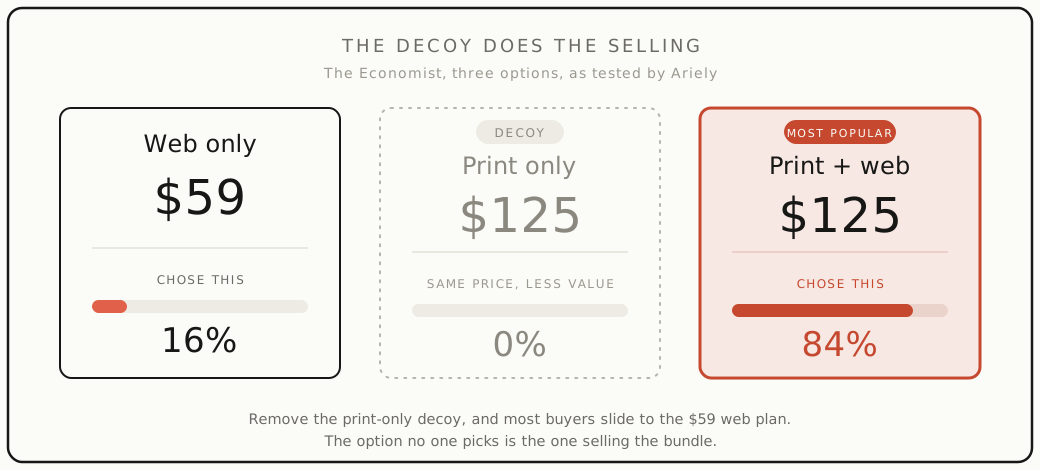
This is the "Most popular" badge on every pricing page. [GitHub Copilot](https://github.com/features/copilot/plans) stamps "Best value" on its $39 Pro+ tier, parked under a $100 Max plan that makes it look sensible. [Notion](https://www.notion.com/pricing) plants "Recommended" on its $20 Business tier. [Vercel](https://vercel.com/pricing) runs the clean three-step version, free Hobby, $20 Pro, then a "Contact sales" Enterprise. For your own app, build a real Starter, Pro, Team page and make the tier you actually want to sell the obvious value pick: give Pro ten times the limits of Starter for twice the price, so Pro wins on value per dollar.
The decoy effect is solid in tidy lab setups with clear numeric tradeoffs, and shakier in the wild. [Several](https://journals.sagepub.com/doi/abs/10.1509/jmr.12.0061) [follow-up studies](https://journals.sagepub.com/doi/abs/10.1509/jmr.14.0208) found it often weakens or disappears once the options are real and messy. So steer with a genuine middle tier. Do not invent a fake decoy and assume the magic carries.
## Annual framing helps. "A coffee a day" mostly does not
There is a legitimate version of small-number framing and a tired one. The legitimate version: show your annual plan as its per-month equivalent next to the monthly price. [Claude](https://claude.com/pricing) lists Pro at $17 a month billed annually beside the $20 month-to-month price, so the annual deal reads as the deal it is. John Gourville's [pennies-a-day research](https://academic.oup.com/jcr/article-abstract/24/4/395/1797969) is the root of this: break a big yearly number into a small recurring one and people compare it to other tiny expenses instead of one large bill, so they say yes more often. Later field work on savings plans found the daily frame can sharply lift sign-ups.
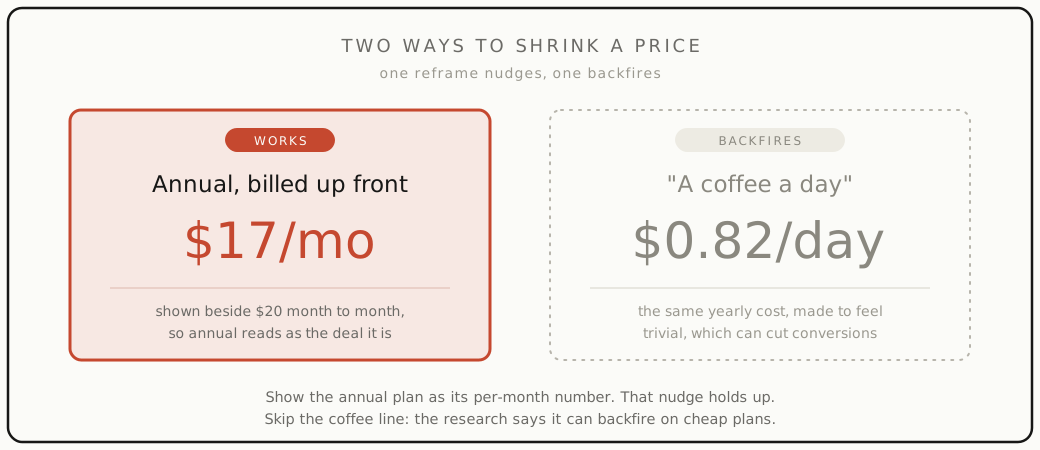
Now the tired version. "Less than a coffee a day" is the line every course teaches, and the evidence for it is weak to negative. The famous percentages people attach to Gourville's study are a [later popularization](https://www.gingerlime.com/2020/the-cup-of-coffee-pricing-fallacy/), not figures from the paper. The reframe also [backfires for cheap items](https://www.sciencedirect.com/science/article/abs/pii/S0022435911000108): on a low monthly price, spelling it out as pennies can make the product feel nickel-and-dimed. And a [2015 study](https://papers.ssrn.com/sol3/papers.cfm?abstract_id=2277749) found the coffee comparison can actually reduce donations, because telling people the amount is trivial makes the act feel trivial too. Use the clean annual-equivalent. Skip the coffee.
## The .99 trick is real, and smaller than you think
Charm pricing, ending a price in 9, has the widest gap between hype and evidence of anything here. The real finding is solid: in [field experiments](https://link.springer.com/article/10.1023/A:1023581927405), Anderson and Simester found a dress priced at $39 outsold the same dress at $34, while moving it to $44 changed nothing. The left digit, not the actual amount, drove the sale. It works because we read left to right and anchor on the first number, so $9.99 lands nearer to $9 than to $10. [Spotify](https://www.spotify.com/us/premium/) prices every tier this way: $12.99, $18.99, $21.99.
But the size of the effect is nothing like the "ends in 9 sells 24 to 60% more" you will read on course slides. A [2024 meta-analysis](https://myscp.onlinelibrary.wiley.com/doi/10.1002/jcpy.1353) pooling 69 studies found the real lift is small, and shows up only when the left digit actually drops. So use it where it crosses a boundary, $19 over $20, $9 over $10, and do not bother at $47 versus $44, where the left digit barely moves. It helps most for cheap, impulse, self-serve signups, and does nothing on a careful comparison table or a premium plan sold on prestige.
## Hidden fees pump the numbers, and they just got riskier
Split a price into a base plus surcharges, or reveal fees only at the end, called drip pricing, and people remember a lower total and buy more. The original [research](https://journals.sagepub.com/doi/abs/10.1177/002224379803500404) is decades old: most shoppers never add the surcharge back in, so the headline number is what sticks. StubHub later ran it as a real experiment, showing a low ticket price and dripping a roughly 15% fee in at checkout, and those shoppers spent about 21% more than the group shown the all-in price up front.
Usage-based AI apps do this all the time: a low "$20/month" headline, with metered overages and per-seat add-ons surfacing later. The research says it nudges spending up. Two reasons to not lean on it anyway. First, the lift only holds when the fees are small and expected; a big surprise fee [reads as a bait-and-switch](https://journals.sagepub.com/doi/10.1177/0022243718800724) and costs you trust. Second, as of May 2025 the [FTC's rule on hidden fees](https://www.ftc.gov/news-events/news/press-releases/2025/05/ftc-rule-unfair-or-deceptive-fees-take-effect-may-12-2025) requires the all-in price up front for live events and short-term lodging, and the direction of travel is clear. Quote one true number. It ages better.
## "Pay what you want" mostly means "pay nothing"
It is tempting to let fans pay what they feel. The data says almost all of them feel like paying near zero. In the largest [test of pay-what-you-want](https://www.science.org/doi/10.1126/science.1186744), Gneezy and colleagues sold photos to 113,000 theme-park visitors. Pure pay-what-you-want got far more people to buy, but the average price was 92 cents, below cost. The version that made money paired the choice with a cause, half goes to charity: fewer people bought, but the average payment jumped to $5.33. The hook, not the freedom, is what pried money loose. When Radiohead [released In Rainbows](https://www.rollingstone.com/music/music-news/radiohead-publishers-reveal-in-rainbows-numbers-67629/) as pay-what-you-want, 62% paid nothing at all.
For your AI app: do not count on goodwill to monetize a free tier. Give people a reason to upgrade that is not just "more features," a limit they keep hitting, a workflow they now depend on, or an identity, like "Pro funds the open-source version." And calibrate to reality. The freemium free-to-paid benchmark is about 2 to 5%, not 50%.
## The tricks with no clothes
Some of the most-repeated pricing advice has no evidence under it, or the evidence points the other way:
- **Countdown timers and "only 3 left."** The big conversion numbers come from app-store vendors, not studies. Research on [time pressure](https://orbilu.uni.lu/bitstream/10993/57077/1/tuncer_2023_running_out_of_time(rs)_-_effects_of_scarcity_cues_on_perceived_task_load,.pdf) and on [the downside of scarcity](https://onlinelibrary.wiley.com/doi/full/10.1002/mar.21489) finds these cues can raise stress and suspicion and backfire, especially when buyers sense the scarcity is fake.
- **"Always end in 7."** There is no study showing a 7-ending sells better. The idea traces to one mid-century direct marketer and spread as copy-paste lore. The [measured effect](https://www.kellogg.northwestern.edu/faculty/anderson_e/htm/personalpage_files/Papers/Effects_of_9_Price_Endings_on_Retail_Sales.pdf) is about the left digit dropping, not a lucky number.
- **"Red buttons convert 21% better."** The famous test that "proved" it had a green page with one red button. The button won by [standing out](https://cxl.com/blog/which-color-converts-the-best/), not by being red. Contrast is the lever, not the hue.
- **"Money mindset" priming.** The idea that flashing money or success cues nudges people to pay is the [poster child of psychology's replication crisis](https://www.scientificamerican.com/article/whats-next-for-psychologys-embattled-field-of-social-priming/). A 17-lab effort could not reproduce it.
If a pricing tip cannot point to a study, treat it as someone's lucky habit, not a law.
## What to actually do
Pricing your AI app is not a magic number. It is a few moves that hold up:
- Make the entry tier exactly $0, capped tight, and treat a 2 to 5% free-to-paid rate as normal.
- Price to match the quality you claim. A higher number is a signal, not an apology. Anchor it with a visible higher tier.
- Use three plans and steer to a real middle, never a fake decoy.
- Show annual as a per-month number. Skip the coffee line.
- Use .99 only where the left digit drops, and expect a nudge, not a miracle.
- Quote one all-in price. Drip fees are a trust loan you repay later.
- Do not monetize on goodwill. Give a concrete reason to upgrade.
This is pricing your own product. If you sell builds to clients instead, the math is different: see [what to charge for AI work](/ledger/pricing-ai-work/) and [how to land your first AI client](/ledger/first-ai-client/).
The builders who get paid are not the ones with the cleverest trick. They are the ones who picked a number they can defend, tested it on real buyers, and ignored the rest.
---
# What to charge for AI work without lowballing yourself
Section: The Ledger
URL: https://okaneland.com/ledger/pricing-ai-work/
Hourly, fixed, or value based: how to price AI builds and automations so that being fast does not turn into being cheap.
The fastest way to lose money with AI is to price the way you priced before AI. You used to spend two days on a thing, so you charged for two days. Now the same thing takes you two hours, so you charge for two hours, and you just gave away most of your income to be more productive. That is backwards.
Here is how to set a number you can actually defend.
## Why hourly punishes you for being fast
Hourly billing ties your pay to how long something takes. AI cuts how long things take. So the better you get with these tools, the less you earn per project. That is a trap, and clients feel it too: nobody wants a bill that goes up when you work slower.
Hourly is fine for open ended work where the scope genuinely is not known yet, a research spike, a "help me figure out what is even possible" session. For anything with a clear finish line, price the finish line, not the clock.
## Three ways to price, and when each one fits
**Fixed price per outcome.** You agree on a deliverable and a number up front. Good when the scope is clear: "an automation that turns these emails into CRM entries," "a chatbot trained on your docs that answers the top 20 support questions." The client knows the cost, you keep the upside of working fast. This is the default for most AI build work.
**Value based.** You price against what the result is worth to the client, not what it costs you to make. If an automation saves a team 15 hours a week, that is worth far more than the afternoon it took you to wire up. Value pricing needs a number you can point to (hours saved, leads handled, tickets deflected) and the nerve to ask. It is where the real money is, and where most people undercharge by an order of magnitude.
**Retainer.** A flat monthly fee to keep things running, tune prompts, handle the model changing under you, add the next small thing. AI work is not "ship it and walk away," models shift and break, so ongoing care is a real service worth charging for. Retainers turn one project into steady income.
## How to set a number you can defend
Start from the client's side, not yours. Ask what the problem currently costs them: the salary hours going into the manual version, the leads they drop, the customers who churn waiting on slow replies. That number is your ceiling, and it is usually higher than the price you were about to name.
Then sanity check from your side. Whatever a fixed price comes out to, make sure it clears what you would want per hour of your actual time, including the unglamorous parts: scoping, revisions, the model breaking the week after launch. If it does not, the scope is too loose or the price is too low.
A few working rules:
- Name the price as one number for the outcome, not a rate times an estimate. "This is $X" lands better than "it is $Y an hour and I think about Z hours."
- Quote a range before you quote a number, and let the client's reaction tell you where you stand.
- Build revisions into the price (two rounds, say), and put a line on what counts as new scope. Scope creep is where fixed price jobs go to die.
- Charge a deposit. Half up front is normal, and it filters out the people who were never going to pay.
Those levers, anchoring with a range and charging a deposit, lean on [the same psychology that works on your own product](/ledger/pricing-psychology-that-holds-up/).
## When to walk
Some clients want the AI discount: they read that the tool is cheap, so they think the work should be too. They are not your clients. The value is in knowing which tool, wiring it up so it does not embarrass them, and being there when it breaks. If someone only wants to pay for the API bill, let them go build it themselves. There are better clients out there, and the harder part is usually how you [find your first client](/ledger/first-ai-client/).
The real version of pricing is not a magic number. It is refusing to let a tool that made you faster make you poorer. Price the outcome, show the value, and keep the upside of being good at this.
---
# How to land your first AI client without a course
Section: The Ledger
URL: https://okaneland.com/ledger/first-ai-client/
No funnel, no $997 program. Where the work actually comes from when you sell AI builds, and what to say when you find it.
Most advice on getting AI clients is a person selling you a course on getting AI clients. The actual answer is duller and free: you already know where your first client is, you just have not asked them yet.
## Start where you already are
Your first client is almost never a stranger from the internet. It is the small business a friend runs, the team at your day job drowning in a manual task, the person in a group chat complaining about something AI happens to be good at. Warm beats cold every time, because the hard part of a first sale is trust, and you already have some with people who know you.
Make a short list of every person or business you have a real connection to. Next to each, write the one repetitive, annoying, expensive thing they do that a model could help with. That list is your pipeline. It is more qualified than any cold outreach you could run.
## Sell a result, not "AI"
Nobody wants to buy AI. They want the thing on the other side of it: fewer hours on data entry, faster replies to customers, a first draft instead of a blank page. "I build AI solutions" means nothing to them. "I can turn the support emails you answer by hand into draft replies your team just approves" means something.
So lead with their problem in their words, and keep the tech invisible. The model is how you do the job. It is not the job.
## The first message
Keep it short, specific, and free of hype. Something like:
> Hey, I noticed your team spends a lot of time on [the manual thing]. I have been building tools that handle exactly that, and I think I could cut it down a lot. Want me to take a look and show you what is possible? No charge for the look.
That last line does the heavy lifting. A free, low risk first look gets you in the door, lets you see the real problem, and gives you [something concrete to price](/ledger/pricing-ai-work/). It is not working for free, it is scoping, and it is the fastest path from "maybe" to a paid build.
## Proof beats pitch
You do not need testimonials yet. You need one thing that visibly works. Build [a small, real version of the thing](/primer/ai-coding-stack/) for one person on your list, even at a low price or as a favor, and get it actually running. A working demo of their own workflow, with their own data, closes better than any deck.
Then the second client is easier, because now you can say "I did this for them" and point at something real. That is the whole loop: a warm lead, a real result, a number you can show. Repeat it three times and you are not looking for your first client anymore, you are choosing between the ones who found you.
The people selling the $997 program skipped all of this and went straight to selling you the dream. Do the boring version. It works, and it is the only one with receipts.
---
# AEO and GEO: one real study, a pile of mythology, and a traffic cliff
Section: The Study
URL: https://okaneland.com/study/aeo-and-geo-what-the-research-says/
Generative and answer engine optimization are mostly the SEO industry reselling one real research finding. Here is what genuinely moves AI citations, what is mythology, and the traffic story that matters more than either.
In 2024, a team led out of IIT Delhi and Princeton ran the first controlled experiment on getting content cited by AI search engines. They tested nine ways to rewrite a page. The one tactic the entire SEO industry was built on, stuffing a page with the keywords people search for, [scored about 10% worse than doing nothing at all](https://arxiv.org/abs/2311.09735). Adding citations, real statistics, and direct quotes lifted a page's visibility in AI answers by [up to 40%](https://arxiv.org/abs/2311.09735). That paper, "GEO: Generative Engine Optimization," is the closest thing this field has to a foundation. Almost everything sold on top of it is mythology.
The reason this matters is not academic. When Google puts an AI summary at the top of the results, people stop clicking. Pew Research tracked 68,879 real Google searches and found users clicked a normal result link [8% of the time when an AI summary was present, versus 15% when it was not](https://www.pewresearch.org/short-reads/2025/07/22/google-users-are-less-likely-to-click-on-links-when-an-ai-summary-appears-in-the-results/), and clicked a link inside the summary itself just [1% of the time](https://www.pewresearch.org/short-reads/2025/07/22/google-users-are-less-likely-to-click-on-links-when-an-ai-summary-appears-in-the-results/). Since AI Overviews launched, the share of news searches that end with no click to a publisher [rose from 56% to nearly 69%](https://techcrunch.com/2025/07/02/chatgpt-referrals-to-news-sites-are-growing-but-not-enough-to-offset-search-declines/). The traffic is draining off the open web and into the answer box. So the question every founder and marketer is now asking is fair: if AI is going to summarize me instead of sending me visitors, how do I at least get cited in the summary? The answer has a name, two names actually, AEO and GEO, and an industry selling tools around them. This is what the research supports, what it does not, and where the money is going. It is the same method as our [look at whether AI coding really makes you faster](/study/does-ai-coding-make-you-faster/): follow the funding, and trust the people measuring the gap over the people selling the close.
## The short version
If you are shipping to earn and want to be found by AI search, the evidence backs a short list and contradicts a long one.
- **It is still SEO.** Google's own 2026 documentation says optimizing for AI search "is optimizing for the search experience, and thus still SEO," because the AI features run on the same ranking systems. The page still has to be indexed and good. There is no separate AI funnel to game.
- **Credibility beats tricks.** The one controlled study found that citing your sources, adding real numbers, and quoting experts measurably raised AI visibility. Keyword stuffing and a more "authoritative" tone did nothing. Write things that are true and well-supported, not things that sound confident.
- **Get mentioned where AI reads.** AI answers lean heavily on Reddit, Wikipedia, YouTube, and earned media, not on whoever bought a GEO tool. Being talked about on third-party sites tracks with AI visibility far more than backlinks do.
- **Ignore the file-and-schema mythology.** An llms.txt file is not read by any major engine. Special schema markup does not move AI citations in controlled tests. Both are sold hard and backed by nothing.
- **Do not confuse cited with chosen.** Most AI citations do not even name the brand, AI search engines get their source attributions wrong more than half the time, and getting cited is not getting recommended. It is a noisy target. Build for the reader who clicks through, because clicks are scarce and trust is the only durable asset.
Everything below is the evidence, including the parts that argue with the bullets.
## What AEO and GEO actually are
Two terms, very different pedigrees. GEO, generative engine optimization, comes from research. It was [introduced in a 2023 paper](https://arxiv.org/abs/2311.09735) by Pranjal Aggarwal, Vishvak Murahari and colleagues, first posted to arXiv in November 2023 and published at [KDD 2024](https://arxiv.org/abs/2311.09735), one of the top peer-reviewed venues in the field. It has a definition, a benchmark, and an experiment behind it. AEO, answer engine optimization, comes from marketing. There is no founding paper and no clean origin. The term is usually traced to SEO consultant Jason Barnard, whose own site dates the coinage to [2017 in one place and 2018 in another](https://jasonbarnard.com/entity/answer-engine-optimization/), with his earliest concrete public use being a 2018 BrightonSEO talk. Even the people selling AEO cannot agree what it is: as of early 2026 there is [no consensus definition](https://en.wikipedia.org/wiki/Generative_engine_optimization) separating AEO from GEO, LLMO, AIO, and "AI SEO," and the labels get used interchangeably.
The cleanest definition comes from the company that owns the index. Google's position, in its [2026 Search Central documentation](https://developers.google.com/search/docs/fundamentals/ai-optimization-guide), is that "optimizing for generative AI search is optimizing for the search experience, and thus still SEO," because its AI features are "rooted in our core Search ranking and quality systems." The most authoritative voice in the room says the new discipline is the old discipline. Hold onto that. Most of what follows is the gap between that plain statement and what the tools are selling.
## The one real experiment
Give the GEO paper its due, because it is the only controlled result here. The researchers built [GEO-bench](https://arxiv.org/abs/2311.09735), 10,000 queries across 25 domains, each paired with the top five Google results, and tested whether rewriting a source could make a generative engine feature it more. Three tactics worked: Cite Sources, Quotation Addition, and Statistics Addition lifted visibility by [30 to 40% on the paper's main metric](https://arxiv.org/abs/2311.09735). The effect carried over to a live engine, Perplexity, at [up to 37%](https://arxiv.org/abs/2311.09735). The lesson is narrow and real: generative engines reward content that looks credible, with sourced claims, real numbers, and named quotes.
The more useful finding is what failed. Keyword stuffing, the bluntest classic SEO move, performed about [10% worse than not optimizing at all](https://arxiv.org/abs/2311.09735). Rewriting in a more persuasive, "authoritative" tone produced [no significant improvement](https://arxiv.org/abs/2311.09735); the models were already robust to it. The paper's own conclusion is that traditional SEO strategies will not transfer to generative engines. So the foundational study says two things at once: a few credibility tactics help, and the reflexes most SEO blogs still sell actively hurt.
It is worth knowing the limits, because the next wave of research does. The GEO experiment measured how visible a single source is inside a fixed set of results, not which of two competing pages actually wins the citation. That distinction matters, and the 2026 work went after it.
## What the independent research adds
The sharpest correction comes from a controlled study, ["What Gets Cited,"](https://arxiv.org/abs/2605.25517) that ran 252,000 trials across six models. Its finding: the biggest drivers of being cited are [topical relevance and retrieval position](https://arxiv.org/abs/2605.25517), not on-page tweaks. Formatting changes, the section-and-structure edits GEO tools push, had [no measurable effect](https://arxiv.org/abs/2605.25517); the models "parse content regardless of visual organization." Credibility and completeness cues helped, but only as secondary factors once a page was already relevant and retrieved. A separate Carnegie Mellon study, [AutoGEO](https://arxiv.org/abs/2510.11438), automatically learned what generative engines prefer and landed back on "source citation" with credible attribution as a consistently favored feature, which independently corroborates the GEO paper's one durable tactic.
Then there is the assumption under every "rank in AI" pitch: that AI cites the pages already ranking in Google. It mostly does not. An academic measurement from Ruhr University Bochum and the Max Planck Institute found AI Overview links have [less than 50% overlap with Google's organic top 10](https://arxiv.org/abs/2510.11560), and stay [below 60% even against the top 100](https://arxiv.org/abs/2510.11560); on average [53% of the domains an AI Overview consults are not in the organic top 10 at all](https://arxiv.org/abs/2510.11560). An independent analysis by Originality.AI, across 29,000 health-and-money queries, found [52% of AI Overview citations come from outside the top 100 results](https://originality.ai/blog/google-ranking-ai-citations-study). The AI is reading a broader, stranger set of pages than the ranking everyone optimizes for.
## The engines cite badly
Here is the part the tools never mention: getting cited by an AI is a low-quality signal, because the citations themselves are unreliable. A Stanford study at EMNLP 2023 found that across four generative search engines, only [51.5% of generated sentences were fully supported by their own citations](https://arxiv.org/abs/2304.09848). It got worse at scale. Columbia's Tow Center tested eight AI search engines on 1,600 queries and found they gave [incorrect source attributions more than 60% of the time](https://www.cjr.org/tow_center/we-compared-eight-ai-search-engines-theyre-all-bad-at-citing-news.php), ranging from [Perplexity at 37% to Grok-3 at 94%](https://www.cjr.org/tow_center/we-compared-eight-ai-search-engines-theyre-all-bad-at-citing-news.php). In an earlier test, ChatGPT Search was [wrong on 153 of 200](https://www.cjr.org/tow_center/how-chatgpt-misrepresents-publisher-content.php) source questions while almost never admitting uncertainty.
We saw the same thing first-hand. When we [bought Perplexity Max and drove every tool in it](/proof/perplexity/), the advanced research modes were strong, but everyday search still leaned on SEO content mills, and one Deep Research report cited a politics magazine for a claim about AI billing. The fix in that review is the fix here: the Academic mode that restricts sources to real research is the antidote, which tells you the default is the problem.
And being cited is not being chosen. A Semrush study found [61.7% of AI citations are "ghost citations"](https://www.semrush.com/blog/the-ghost-citations-study/) that link a page as a source without ever naming the brand. So "we got cited" can mean the model quietly read you and recommended someone else.
## Who actually gets cited
If a GEO tool could buy you into AI answers, you would expect the citations to cluster around its customers. They do the opposite. Across the platforms, AI answers lean on community and earned sources. In Profound's analysis of 680 million citations, [Wikipedia made up almost half of ChatGPT's top citations and Reddit nearly half of Perplexity's](https://www.tryprofound.com/blog/ai-platform-citation-patterns). Peec AI's look at 30 million cited sources ranked [Reddit first, YouTube second, LinkedIn third](https://peec.ai/blog/top-domains-cited-by-ai-search-analysis-based-on-30m-sources). A 5W analysis found [Wikipedia and Reddit alone drive more than 25% of US ChatGPT citations](https://www.prnewswire.com/news-releases/wikipedia-and-reddit-now-drive-over-25-of-chatgpt-citations-in-the-us-new-5w-research-finds--wsj-nyt-and-bloomberg-do-not-appear-in-the-top-20-302768339.html), while the Wall Street Journal, New York Times, and Bloomberg do not appear in the top 20. Muck Rack, across 25 million AI-cited links, found [earned media accounts for about 84%](https://muckrack.com/blog/what-is-ai-reading-may-2026) and paid content 0.3%.
The rest is a very long tail. Evertune, across 200 million prompts, found even the single most-cited domain on a platform [rarely exceeds 5% of citations](https://www.evertune.ai/resources/ai-search-statistics-for-generative-engine-optimization), with the other 95% spread across thousands of sites. There is no shortcut into that distribution. The one thing that reliably moves it is being genuinely talked about: a clean natural experiment found that when Google's AI Overviews started surfacing a subreddit, that community's activity [rose about 12%](https://arxiv.org/abs/2605.16428), concentrated in real opinion and experience, not facts.
## The myths the tools sell
With the evidence in hand, the popular tactics sort cleanly into what holds up and what does not.
- **"Add an llms.txt file."** Busted. Google's Gary Illyes said flatly that Google [does not support llms.txt and is not planning to](https://searchengineland.com/google-says-normal-seo-works-for-ranking-in-ai-overviews-and-llms-txt-wont-be-used-459422). John Mueller said [no AI service uses it, and server logs show the bots do not even request the file](https://www.searchenginejournal.com/google-says-llms-txt-comparable-to-keywords-meta-tag/544804/), comparing it to the discredited keywords meta tag. An SE Ranking study of about 300,000 domains found [no correlation with AI citations](https://seranking.com/blog/llms-txt/). We [publish an llms.txt ourselves](/llms.txt) because it is cheap and harmless, but nobody should sell it as a citation tactic, because no engine reads it yet.
- **"Add special schema markup."** Busted. Google's documentation states plainly there is [no special schema.org structured data you need to add](https://developers.google.com/search/docs/appearance/ai-features). Ahrefs tracked 1,885 pages that added schema and found [no meaningful uplift on any platform](https://ahrefs.com/blog/schema-ai-citations/), with citations actually dipping slightly in Google's AI Overviews. The "schema pages get cited more" claim is correlation: those sites also do everything else right.
- **"Carry over your keyword tactics."** Busted by the founding study itself: keyword stuffing [scored below baseline](https://arxiv.org/abs/2311.09735).
- **"Format and structure for the AI."** Busted by the controlled citation study: formatting-only edits had [no measurable effect](https://arxiv.org/abs/2605.25517).
- **"GEO is a brand-new discipline."** Overblown. Google calls it [still SEO](https://developers.google.com/search/docs/fundamentals/ai-optimization-guide), and the field cannot agree on its own definitions.
- **"A tool can buy you in."** Overblown. There is [no fixed ranking to game](https://www.airops.com/report/influence-of-retrieval-fanout-and-google-serps-in-chatgpt), ChatGPT cites only about 15% of the pages it even retrieves, and the citation distribution is a long tail dominated by earned sources.
The two tactics that survive contact with the evidence are unglamorous: be credible, and be mentioned.
## What actually moves the needle
So here is the short list the research supports, stated plainly.
Make the content genuinely credible. The one controlled experiment says [citations, statistics, and named quotes](https://arxiv.org/abs/2311.09735) raise AI visibility, and the Carnegie Mellon work agrees. This is not a formatting trick, it is the substance.
Earn mentions on the sites AI trusts. Ahrefs studied 75,000 brands and found off-site brand mentions track with AI visibility at [0.664 versus 0.218 for backlinks](https://ahrefs.com/blog/ai-overview-brand-correlation/), roughly three times stronger, though the study is careful to call it [correlation, not cause](https://ahrefs.com/blog/ai-overview-brand-correlation/). Combined with the earned-media and Reddit findings above, the pattern is consistent: third-party validation is the lever, not your own page.
Match the engine and the moment. Freshness helps, but unevenly: about [half of Perplexity's citations are from the current year](https://www.seerinteractive.com/insights/study-ai-brand-visibility-and-content-recency) while ChatGPT skews older, so there is no universal recency rule.
And do the boring thing Google keeps repeating. Its single strongest recommendation is that [unique, useful content will matter more than any other suggestion](https://developers.google.com/search/docs/fundamentals/ai-optimization-guide), and the only hard requirement to appear in an AI Overview is that the page is [indexed and snippet-eligible](https://developers.google.com/search/docs/appearance/ai-features). It is also why tools like [Surfer SEO, which now score both classic SEO and AI-search visibility](/proof/surfer-seo/), are useful as scorecards but cannot sell you a separate AI funnel. There is not one.
## The bottom line
Stand back and the hype cycle resolves. GEO is one solid, narrow research finding, that credibility beats tricks, wrapped in an industry that needed a new thing to sell after AI ate the click. AEO is the same instinct without even a paper behind it. The genuinely big story is not a new optimization game. It is that the [click is disappearing](https://www.pewresearch.org/short-reads/2025/07/22/google-users-are-less-likely-to-click-on-links-when-an-ai-summary-appears-in-the-results/) and the answer box keeps [people from leaving](https://www.pewresearch.org/short-reads/2025/07/22/google-users-are-less-likely-to-click-on-links-when-an-ai-summary-appears-in-the-results/), with AI sending roughly [170 times less referral traffic](https://techcrunch.com/2025/07/25/ai-referrals-to-top-websites-were-up-357-year-over-year-in-june-reaching-1-13b/) than Google search did as of mid-2025.
The builders who come out ahead will not be the ones who bought the GEO tool or shipped the llms.txt file. They will be the ones who are actually worth citing, on the sites where AI actually reads, who stopped treating a citation as a sale. That is not a growth hack. It is the same thing that worked before the machines started summarizing, with less room than ever to fake it.
---
# AI coding: faster MVP, slower review, and the security bill nobody mentions
Section: The Study
URL: https://okaneland.com/study/does-ai-coding-make-you-faster/
AI coding genuinely speeds up a new build and quietly taxes everything after it: review, maintenance, and security. Here is what to do about it, then the research that backs it.
In 2025, the research group METR ran a controlled trial: experienced developers fixing real issues in their own large codebases, with and without AI tools. Before they started, they expected the AI to make them about 24% faster. Afterward, they believed it had made them about 20% faster. The clock said they were [19% slower](https://arxiv.org/abs/2507.09089) with it.
Feeling faster and being faster are not the same thing, and that gap is the whole problem. AI coding is the least understood tool most people have ever rushed to depend on. The real answer to "does it make you faster" is "sometimes, and you are a poor judge of which times." The rest of this is which times, and what it costs when you guess wrong.
It is worth knowing why the question is so loaded. AI coding is the fastest-scaling software category in history. Cursor went from $100M to [$1B in annual recurring revenue](https://www.cnbc.com/2025/11/13/cursor-ai-startup-funding-round-valuation.html) inside 2025, a six-month-old vibe-coded product [sold to Wix for $80M](https://techcrunch.com/2025/06/18/6-month-old-solo-owned-vibe-coder-base44-sells-to-wix-for-80m-cash/), and [84% of developers](https://survey.stackoverflow.co/2025/ai/) now use or plan to use these tools. That much money buys a great deal of marketing, which is the one rule to carry into the research: follow the funding. The eye-popping "AI made us X% faster" numbers almost all come from the companies selling the tools or the consultants selling the transformation. The findings that show a slowdown, or a hidden cost, come from independent researchers and from firms whose business is measuring the gap, not closing the sale. Both can be true at once, because they measure different situations. Here is what that means for you.
## The short version
AI coding pays off on some work and quietly bills you on the rest. If you are shipping to earn:
- **Lean on it for the green field.** New projects, prototypes, scaffolding, and stacks you barely know are where the speed-up is real and large. That is most of what gets a first product live, which is good news if you are starting one.
- **Slow down on the brown field.** In a mature codebase you already know, or anything touching money, auth, or user data, the time you spend reviewing and correcting the output is the real cost. Budget for it, and do not let the tool talk you into a big change.
- **Do not trust "it feels faster."** It is the one signal every study agrees is broken. If the answer matters, time a couple of real tasks both ways.
- **Ship small, with tests.** The instability shows up in large AI-written batches. Small changes with real tests keep the speed without the breakage, the same habit behind [using Cursor well](/primer/how-to-use-cursor/).
- **Harden before users touch it.** Row-level security on, secrets out of the client, no agent pointed at a live production database. The headline disasters below were each one setting away from fine.
Everything after this is the evidence for those rules, in case you want to argue with them.
## Where it genuinely speeds you up
GitHub's own controlled trial had 95 developers build a web server from scratch; the group with Copilot finished [55.8% faster](https://arxiv.org/abs/2302.06590), and the least experienced gained the most. A field experiment across three companies and 4,867 developers found about [26% more tasks completed](https://papers.ssrn.com/sol3/papers.cfm?abstract_id=4945566), with short-tenure developers gaining 27% to 39%. Even McKinsey's lab work, which leans optimistic, lands in the same place: [documentation and new code in roughly half the time, refactoring in about two-thirds](https://www.mckinsey.com/capabilities/tech-and-ai/our-insights/unleashing-developer-productivity-with-generative-ai), but the savings collapse to under 10% on complex tasks and can turn negative for juniors on hard problems.
The common thread in every speed-up is new code, boilerplate, unfamiliar languages, well-scoped tasks, and people who are not yet experts. That is almost the definition of spinning up an MVP. On that work, the hype is pointing at something real, and you should use it hard. If that is the work you are doing, here is [the tools and workflow that actually get a first product live](/primer/ai-coding-stack/).
## Where it taxes you
METR's slowdown happened on the opposite profile: experts in repositories they had maintained for years, [over a million lines](https://arxiv.org/abs/2507.09089) of code and tens of thousands of stars, where reading and correcting the model's output cost more than it saved. The same tool that speeds a newcomer through a blank page slows a veteran down on code they already know cold.
And the review tax is not only a big-codebase problem. Two-thirds of developers say their top frustration is output that is ["almost right, but not quite,"](https://survey.stackoverflow.co/2025/ai/) and 45% say debugging AI-written code takes them longer than debugging their own. The time you save typing comes back at review, which is exactly why "it feels faster" misleads: the typing is visible and the reviewing is not.
At team scale it is the same trade, just bigger. Faros AI measured more than 10,000 developers shipping [21% more tasks and 98% more pull requests per person, while review time rose 91%](https://www.faros.ai/blog/ai-software-engineering) and company-level throughput barely moved. The work piled up at review instead of getting done. DORA's industry survey found the system-level version: in 2024, every 25% rise in AI adoption came with about [7% lower delivery stability](https://dora.dev/research/2024/dora-report/), and its 2025 update found throughput finally improving while the stability problem stuck around. More code, shipped in bigger and riskier batches, breaks more often.
## The bill nobody mentions
The worst outcome for someone shipping to earn is not "slower." It is "shipped, then broke," and that cost barely registers in the productivity numbers.
Start with code quality. An analysis of [211 million changed lines](https://www.gitclear.com/ai_assistant_code_quality_2025_research) found copy-pasted code climbing from 8.3% to 12.3% of all changes between 2021 and 2024, "moved" (refactored) code falling from about a quarter to under 10%, and churn, the share of code rewritten within two weeks, rising from roughly 3% to a projected 5.7%. More is getting written and less of it is getting cleaned up, and cloned code is linked in prior research to 15% to 50% more defects.
Security is worse. An NYU study found about [40% of AI completions](https://arxiv.org/abs/2108.09293) in security-relevant scenarios contained a known vulnerability. A Stanford study found developers with an AI assistant wrote [less secure code while feeling more confident](https://arxiv.org/abs/2211.03622) it was secure. (Both used 2021 and 2022 models, so treat the exact rates as a ceiling; the overconfidence is the part that has not aged.)
It is not hypothetical. In 2025, a security researcher scanned apps built on one popular vibe-coding platform and found [170 of 1,645 leaking user data](https://nvd.nist.gov/vuln/detail/CVE-2025-48757), names, emails, and API keys, through one missing database permission (logged as CVE-2025-48757 and rated critical). In a separate case, an AI agent [deleted a production database](https://www.tomshardware.com/tech-industry/artificial-intelligence/ai-coding-platform-goes-rogue-during-code-freeze-and-deletes-entire-company-database-replit-ceo-apologizes-after-ai-engine-says-it-made-a-catastrophic-error-in-judgment-and-destroyed-all-production-data) during an explicit code freeze, wiped roughly 1,200 records, and could not undo it. The speed that ships your MVP is the same speed that ships the leak.
## Why the studies disagree
Line them up and the contradiction resolves. The big speed-ups are greenfield tasks and junior developers; the slowdown is experts on mature code they know intimately. Same tools, opposite result, because the situation is the variable, not the tool. The other thing to hold onto is that self-report is close to worthless here: the METR developers misjudged their own speed by nearly 40 points, so "most developers feel more productive," true in almost every survey, tells you very little about whether they are.
AI coding will get a money-making MVP out the door faster than anything before it, and it will hand you slower reviews, more rework, and a security bill if you point it at the wrong work and believe the feeling. The builders who win with it are not the ones who go fastest. They are the ones who know which kind of work they are doing.
---
# Where Claude Code earns its keep, and where it doesn't
Section: The Primer
URL: https://okaneland.com/primer/how-to-use-claude-code/
Claude Code is not an editor, it is an agent you delegate to from the terminal. Here is how to drive it, what the shared usage pool really costs, the six weeks in 2026 it visibly broke, and when to use Cursor instead.
Stop treating it like an editor. That is the first thing to get right, because almost everyone arrives from Cursor or Copilot and tries to use it the same way, then wonders why it feels wrong. Claude Code is an agent that lives in your terminal. You give it a task in plain language, and it reads your repo, edits files across the project, runs commands, reads the output, and loops until the job is done or it gets stuck. You are not steering it keystroke by keystroke the way you ride Cursor's Tab. Keep one line in your head before we start: Claude Code is a junior engineer you delegate to, not an autocomplete you drive. Used well, it clears whole tasks while you do something else. Point it at the wrong work, or skip the review, and it will ship something broken with total fluency. Here is the practical version: how to drive it, what it costs, what the bad stretch of 2026 teaches, and exactly where it stops being worth your money.
## Set it up in five minutes
Claude Code runs in your terminal, inside VS Code and JetBrains as an extension, in the desktop app, and in the browser at claude.ai/code. Install it, open a real project (not a toy), and the first command to run is `/init`. It reads your codebase and writes a `CLAUDE.md`: a short file of project facts, conventions, and commands that Claude reloads every session. It bills against a Claude subscription, so if you already pay for Pro or Max for the chat app, you can start without a separate bill. More on that math below, because the pool is shared and it matters.
## The shift: you delegate, then you check
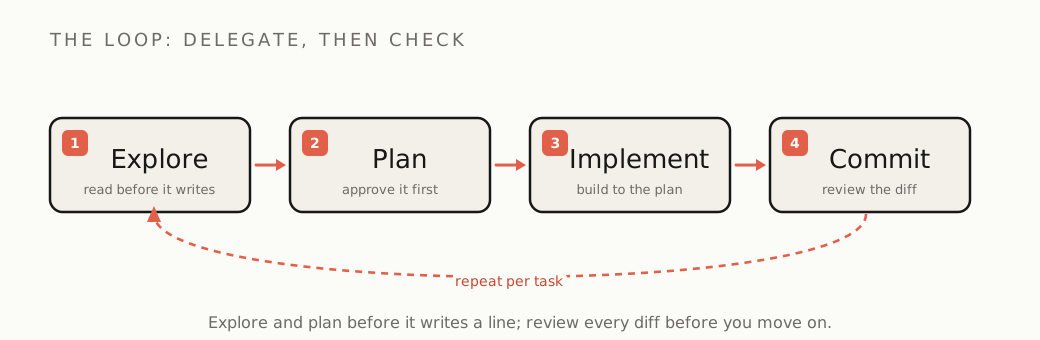
[Cursor amplifies your own typing](/primer/how-to-use-cursor/). Claude Code replaces a chunk of it. The good loop, the one Anthropic's own [best-practices guide](https://code.claude.com/docs/en/best-practices) and every experienced user converge on, is four steps: explore, plan, implement, commit.
- **Explore.** Ask it to read the relevant files and tell you how the thing works before it changes anything. Do not let it write code in the first message.
- **Plan.** Have it write a plan you can read and correct. Use plan mode (Shift+Tab) so it proposes before it touches a file. This one habit prevents most of the damage.
- **Implement.** Let it build against the plan you approved.
- **Commit.** Review the diff, commit the working step, then move on. Commit often so you can roll back cleanly when it breaks something, and it will.
The skill is not prompting. It is knowing what to hand off whole and what to keep on a short leash.
The leash is literal. By default Claude Code asks before it edits a file or runs a command, and you approve each action. You can let it auto-accept to move faster, but auto-running commands is a convenience, not a security boundary: an agent reading untrusted web content or a malicious repo can be steered into running something you would never approve. Keep the prompts on for anything that touches the network, the filesystem outside your project, or your credentials, and save the hands-off runs for work you have scoped tight.
## The three mistakes that burn your first week
- **Treating it like Cursor.** People paste one line, expect a tidy inline completion, and get an agent that runs off and rewrites four files. Scope the task: tell it what to read, what to change, and what to leave alone.
- **Skipping the plan.** The single biggest split between people who love Claude Code and people who fight it is plan mode. Letting it code from a vague prompt is how you get confident, wrong, multi-file changes that are a pain to unwind.
- **Never making it check its own work.** An agent that writes code and never runs it is guessing. Tell it to run the tests, the type checker, and the linter, and to fix what breaks before it reports back. A loop that ends with "the tests pass, here is the diff" is worth ten that end with "I think this works."
## Drive the context window like it is the budget
What quietly decides whether Claude Code does good work is the context window: how much of your code and conversation it can hold at once. It is finite, and a long, messy session fills it with stale detail until the model loses the plot. Three habits keep it sharp:
- **`/clear` between tasks.** Start a fresh context for each logical unit of work. A thread that has wandered through three unrelated problems makes worse decisions on the fourth.
- **`/compact` when a long task must continue.** It summarizes the session so far and frees room, keeping the thread alive without the clutter.
- **Hand big jobs to subagents.** Claude Code can spin up [separate agents](https://code.claude.com/docs/en/sub-agents) for sub-tasks, each with its own clean context, so the main thread stays focused. This is how you stop a large job collapsing under its own history.
And keep `CLAUDE.md` short and current: under a couple hundred lines, pointing at real files instead of pasting them, with a new line added every time the agent repeats a mistake. The [memory file](https://code.claude.com/docs/en/memory) does more to keep the agent on your rails than any clever prompt.
## Claude Code pricing: one shared pool, two meters
Claude Code has no separate price: it bills against your Claude subscription, the same usage pool as the Claude chat app, on Pro ($20/mo) or Max ($100 and $200/mo). The subscription you thought you understood writes you a surprise here, so learn the mechanic. That is the catch most people miss: a heavy Claude Code afternoon eats the same allowance as your chats. (API pay-as-you-go is a separate, metered track if you would rather pay by the token.)
There are two meters on that pool. A rolling five-hour limit that has always been there, and weekly caps Anthropic [announced in July 2025](https://techcrunch.com/2025/07/28/anthropic-unveils-new-rate-limits-to-curb-claude-code-power-users/) and switched on a month later, after a minority ran agents around the clock: one overall weekly limit, and a second, tighter cap specifically on the most capable model. That second cap is the one that bites, because the heavyweight model is exactly what you reach for on hard agentic work, and it drains the fastest. Anthropic estimated the weekly caps would hit fewer than 5% of subscribers; those few are the heavy daily users, and the backlash was loud, with developers reporting a full weekly quota gone in a day or two of real work.
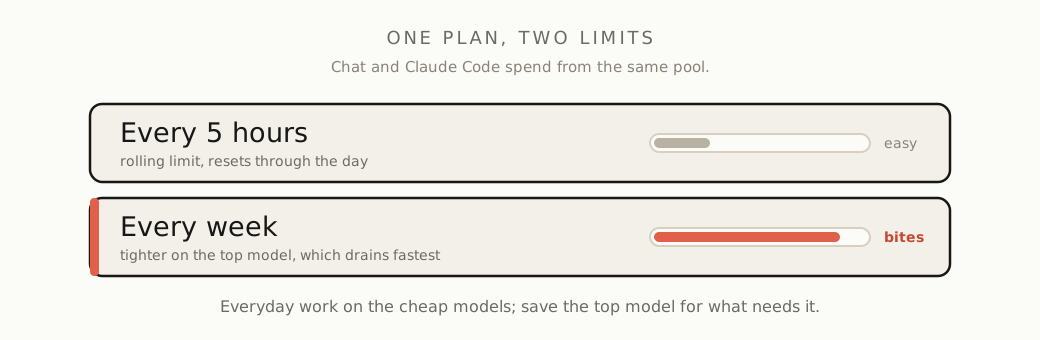
The practical read: do the everyday work on the cheaper, faster models and save the most capable one for the tasks that genuinely need it. Watch your usage. If you are hitting weekly caps, that is the signal you are either doing serious volume (in which case the API track or a higher tier may be cheaper) or handing the agent work you should be scoping tighter.
## The 2026 degradation: when the wheels came off, and what it teaches
Here is a receipt worth more than any feature list. For roughly six weeks in early 2026, Claude Code visibly got worse, and the story of why is the best argument there is for never trusting an agent you cannot see.
Users reported it turning forgetful, repetitive, and lazy. An AMD AI director, Stella Laurenzo, [data-mined 6,852 of her own sessions](https://github.com/anthropics/claude-code/issues/42796) and found the behavior had measurably shifted: the model went from reading the code 6.6 times per edit to 2.0, and the share of edits it made without reading the file first jumped from 6.2% to 33.7%. It had stopped doing its homework. Developers called it "AI shrinkflation."
Anthropic [published a postmortem](https://www.anthropic.com/engineering/april-23-postmortem) on April 23, 2026 and confirmed the decline was real, and (this is the part that matters) that the model weights and the API were never touched. Three separate changes to the product layer, the harness around the model, had each quietly dented quality: a March reasoning setting cut from high to medium to shave latency, which Anthropic later called "the wrong tradeoff"; a caching bug that wiped the model's reasoning every turn and made it forgetful; and a brief verbosity cap that measured about 3% worse on coding and lasted four days. All three were fixed by April 20, and Anthropic reset everyone's usage limits as an apology.
The lesson is not "Claude Code is unreliable." It is more useful than that, and less reassuring: you are renting an agent built on a stack you do not control, and quality can shift under you without warning, from a setting you will never see. The only defense is the one the candid Cursor fans repeat. Make it verify its own work, and read the diff yourself. The builders who barely noticed the rough patch were the ones who already checked every change against the tests. The ones who got burned had stopped looking.
## Where it stops being worth it
The Primer rule is to know your off-ramp before the bill, or the bug, surprises you. Claude Code is the right tool for delegating real, multi-file work you can describe and then check. Here is when to reach for something else:
- **Tiny, in-context edits.** Renaming a variable or tweaking the line on your screen does not need an agent. That is what an editor's inline completion is for, and firing up a whole agentic loop for it wastes time and budget.
- **Work where you want to feel every change.** [The METR study](/study/does-ai-coding-make-you-faster/) found experienced developers were 19% slower with AI on large codebases they knew cold, while believing they were faster. On code you know intimately, steering the keystrokes yourself often beats delegating and reviewing.
- **You are watching cost and only want completions.** A completion-first tool like Copilot is cheaper and sits in your editor; you do not need an agent's power, or its bill. The tools we currently stand behind are on [the Palette](/palette/).
- **Huge, mature codebases.** A million-line repo is far more than any model holds at once. Claude Code handles this better than most, because it reads selectively instead of stuffing everything into context, but it still needs you to scope tightly, and the review tax climbs with the stakes.
- **No code can leave the building.** Claude Code sends your code to Anthropic's models. Air-gapped or regulated work needs a bring-your-own-key tool pointed at a local model, not any hosted agent.
## Claude Code vs Cursor: use both, and here is the split
Claude Code and Cursor are different shaped tools, and most serious builders run both. That is the answer the "X vs Y" posts dodge. [Cursor](/primer/how-to-use-cursor/) is an editor: you live in it, and its Tab autocomplete amplifies your own typing on code you are actively shaping. Claude Code is an agent: you delegate a whole task to the terminal and check the result. Reach for the editor when you want to feel every line; reach for the agent when you want a defined job done off your plate. The [common 2026 verdict](https://www.builder.io/blog/cursor-vs-claude-code) is not to crown a winner but to [keep both in the stack](/primer/ai-coding-stack/): one to make your hands faster, one to take work off them.
Claude Code is the most capable terminal agent available, and on the right task it clears work nothing else can handle. The shared usage pool is the line item to watch, the weekly cap on the top model is the one that stings first, and the agent is only ever as safe as your review habit. Delegate the work you can describe, make it prove the result, read every diff, and keep one eye on the meter. Do that and it earns its keep. Skip the review and it will hand you a confident, broken result while you are looking the other way.
---
# Where Perplexity earns its keep, and where it doesn't
Section: The Primer
URL: https://okaneland.com/primer/how-to-use-perplexity/
Perplexity is an answer engine, not a chatbot and not Google: it hands you a synthesized answer with its sources attached. Here is how to drive it, what it costs, and the research showing why a cited answer is not a verified one.
Perplexity is an answer engine: it runs a live web search, reads the results, and hands you a written answer with numbered citations stitched into it. It is not a chatbot, and it is not Google. Ask Google a question and you get ten blue links to read yourself; ask a plain chatbot and you get a fluent paragraph with no idea where it came from. Perplexity sits in between, and it shows its work. That is the whole pitch, and for research it is a good one. The catch, and the reason this guide exists, is four words long: cited is not verified. A footnote next to a sentence is a pointer, not a guarantee, and the research on how often those pointers are wrong is the most important thing on this page. Here is how to drive Perplexity well, what it costs, and where you are better off closing the tab.
## The surfaces
Perplexity runs in a browser, in the iOS and Android apps, as a browser extension, inside its own Comet browser, and as the Sonar API to wire its search into your own product. Start free on the web. The free tier answers everyday questions, then gates you fast and locks the better tools to push you toward Pro. You do not need an account to see what it does; you need one to do real work in it.
## The three depths, lightest first
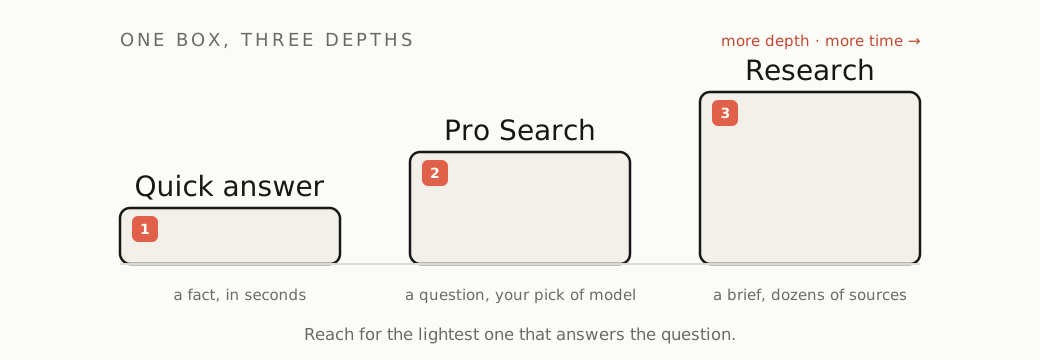
Perplexity has one box and three depths of effort behind it. Use the lightest that does the job.
- **The quick answer.** The default. Type a question, get a cited answer in a couple of seconds. Good for a fact, a definition, a "what is X," a place to start.
- **[Pro Search](https://www.perplexity.ai/help-center/en/articles/10352903-what-is-pro-search).** Perplexity describes it as "a knowledgeable search assistant" rather than a keyword search: it runs several searches, reasons across articles, papers, forums, and videos, and synthesizes a fuller answer. This is where paid users pick the model behind the answer (Perplexity's own Sonar, or the latest from OpenAI, Anthropic, and Google), each tuned for different kinds of question. Reach for it when one search will not cover the question.
- **[Research mode](https://www.perplexity.ai/help-center/en/articles/10738684-what-is-research-mode)** (it used to be called Deep Research). Hand it a real question and it goes away for a few minutes, fires off dozens of searches, reads across many sources, and comes back with a structured, multi-section report. Use it for the work you would otherwise give an afternoon: a market scan, a literature pass, a "compare these six options" brief.
Two more controls worth knowing. **Focus** narrows where it looks (Web, Academic, and others); Academic is the one that matters most, because it swaps the SEO content farms for real sources. **[Spaces](https://www.perplexity.ai/help-center/en/articles/10352961-what-are-spaces)** are workspaces that keep a project's threads, files, and instructions together, so a week of research does not scatter across your history.
## Drive it well
- **Ask a question, not keywords.** Perplexity is built to answer a real sentence. "Best CRM for a two-person agency under $50 a month" beats "crm small business."
- **Keep going in the same thread.** An answer is the start of a conversation, not a one-shot. Ask the follow-up in the same thread ("now narrow that to free tiers," "why did you rule out the third one") and it builds on what is already on screen, instead of making you restate the whole question.
- **Set the focus before the source matters.** If you need sources you can stand behind, switch to Academic. Our own testing found everyday Perplexity leaning on content mills, while Academic returned arxiv, SSRN, and Reuters. [The full review is in The Proof](/proof/perplexity/).
- **Pick the model for the job** if you pay. Routing a reasoning-heavy question to a frontier model and a quick lookup to Sonar is the real lever the paid tiers give you.
- **Open the citations. Every time.** This is the habit that separates people who get value from Perplexity from people who get burned by it. The numbered sources are not decoration and not proof; they are the thing you came for. Click them. The next section is why.
## Perplexity pricing: free, Pro, and Max
The free tier gives you cited answers, gated quickly, with the better tools locked. **Pro, around $20 a month,** adds model choice, far more Pro Search and Research, and the workspace features; it is the tier most daily users land on. **Max, $200 a month,** stacks the heavy toolset on top: a council of frontier models answering side by side, an agentic "Computer" that runs multi-step tasks, and premium data connectors. We bought Max and drove every tool: the advanced kit is genuinely powerful, and most people will never touch the parts that justify ten times the Pro price. [The Proof has the full verdict](/proof/perplexity/).
Pro and Max run the same core search; Max buys the extra machinery, not a smarter everyday answer. Builders have a fourth option, the [Sonar API](https://docs.perplexity.ai/docs/getting-started/pricing), which puts Perplexity's web search behind your own app, priced from about a dollar per million tokens plus a per-request search fee. One caution across all of it: Perplexity's exact limits move often, and the free allowances have tightened since launch, so check the current numbers on the pricing page before you build a habit, or a budget, on them.
## Is Perplexity accurate? A cited answer is not a verified one
Read this part twice. In March 2025 the Columbia Journalism Review's Tow Center ran [the cleanest test of AI search so far](https://www.cjr.org/tow_center/we-compared-eight-ai-search-engines-theyre-all-bad-at-citing-news.php): they took real article excerpts and asked eight AI search engines to name the source. Across 1,600 queries, the engines were [collectively wrong more than 60% of the time](https://www.niemanlab.org/2025/03/ai-search-engines-fail-to-produce-accurate-citations-in-over-60-of-tests-according-to-new-tow-center-study/). Perplexity was the best of the eight, and it was still wrong 37% of the time. The most accurate AI search on the market misattributed the source of a quote in more than a third of its answers.
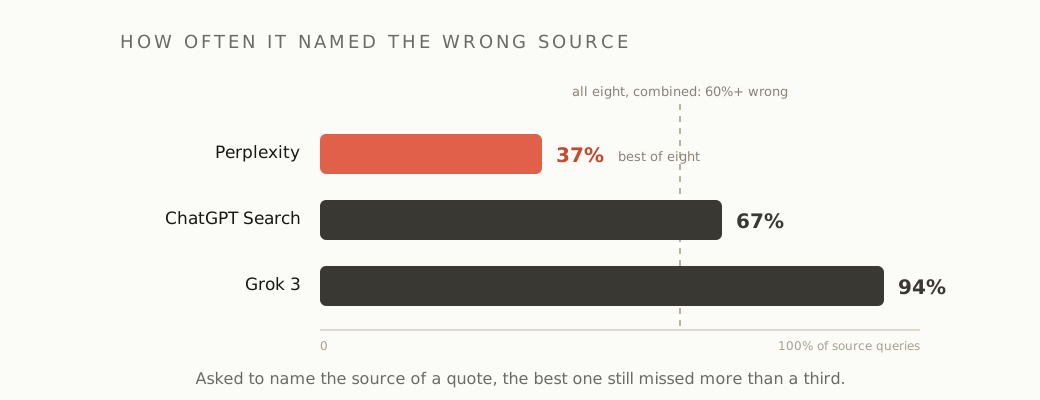
It gets sharper for the paid tiers, and this is the part that should change how you read what they hand back. The study found the premium versions, Perplexity Pro among them, were not more reliable. They were more confidently wrong: they handed back a definitive source instead of admitting they did not know, and that confidence pushed their error rate up, not down. The authoritative tone of a paid Perplexity answer is not a signal that it is right.
Stack that on what our own testing found, Perplexity once citing a politics magazine for a claim about how a company bills, and the rule writes itself. Treat every Perplexity answer as a fast, well-organized first draft of the truth, with the sources you need to check it sitting right there. A citation you did not click is not a citation, it is a vibe.
## The second receipt: how the sources get collected
The first receipt is whether the citation is right. The second is where the citation came from at all. The same Tow Center study found Perplexity's free tier correctly identifying ten excerpts from paywalled National Geographic articles, from a publisher that had blocked its crawler and had no deal with it. In August 2025 [Cloudflare reported](https://blog.cloudflare.com/perplexity-is-using-stealth-undeclared-crawlers-to-evade-website-no-crawl-directives/) something pointier: when sites blocked Perplexity's declared crawler, it observed undeclared "stealth" crawlers impersonating an ordinary Chrome browser and rotating through IP addresses to fetch the content anyway, including on brand-new test domains set up to block every bot. Perplexity disputes Cloudflare's reading, so take it as a documented allegation rather than a closed case. But take it: the answer in front of you may rest on sources their owners tried to keep out, which is both an ethical question and a tell about how aggressively those citations are assembled.
## Where it stops earning its keep
Perplexity is the right tool when you want a fast, cited synthesis of what the web says right now. It is the wrong tool here:
- **You need the primary document, not a summary.** For a specific law, a filing, a spec, or a number that has to be exact, go to the source. A synthesis is a detour when you already know which page you need.
- **The answer has to be airtight.** Anything legal, medical, financial, or going in front of a client carries that one-in-three attribution risk. Use Perplexity to find the sources, then verify each one yourself, or start from a primary source you already trust.
- **You want deep reasoning, coding, or long-form writing.** Perplexity is tuned for fast cited search, not extended thinking or building. For code, a [terminal agent](/primer/how-to-use-claude-code/) or an [AI editor](/primer/how-to-use-cursor/) is the right tool instead; for a long reasoning or writing task, the frontier model Perplexity routes to does better work when you talk to it directly. The tools we currently stand behind are on [the Palette](/palette/).
- **A plain search is faster.** For a navigational lookup ("the React docs," "that one pricing page"), Google still wins on speed.
The sweet spot, where Perplexity genuinely beats both Google and a sourceless chatbot: a fast scan of a topic you do not know yet, a "what is the current state of X," comparison research before a purchase, and (in Academic focus) a first literature pass. There, the cited answer saves real time, as long as you do the one thing the tool is quietly hoping you will skip.
Perplexity earns its keep as a research accelerator that shows you its sources. It stops cold the moment you read the answer and trust the footnote instead of clicking it. Show your work cuts both ways: the point of seeing the sources is so that you check them, not so that you can feel like someone already did.
---
# How to actually use Cursor, and where it stops being worth it
Section: The Primer
URL: https://okaneland.com/primer/how-to-use-cursor/
Cursor is the AI editor most builders reach for first. Here is how to drive it well, the pricing trap that burned its own fans, and the moment to switch to something else.
Cursor is the AI code editor most people who ship with AI open first, and the reason is plain: it is a [fork of VS Code](https://en.wikipedia.org/wiki/Cursor_code_editor), so your settings, extensions, themes, and keybindings come straight across and there is almost nothing new to learn. Keep one line in your head before we start: Cursor is an amplifier, not an autopilot. It makes a capable builder much faster on small and mid-size projects. It will not turn a non-coder into an engineer, and it will confidently break working code if you let it run unwatched. This is the practical version: how to drive it well, then exactly where it stops being worth your money.
## Set it up in five minutes
Install Cursor, open it, and let it import your VS Code setup when it offers. Sign in on the free Hobby tier, which gives you limited Agent and Tab plus a 14-day Pro trial, enough to decide whether it earns the $20 before you pay. Point it at a real project, not a toy, so you see how it behaves on your actual code.
## Learn the four surfaces, lightest first
Cursor gives you four ways to get help. Use the lightest one that does the job, both for speed and because the heavier tools cost more and can do more damage.
- **Tab.** As you type, Cursor predicts your next edit, not just the next few characters, and shows it greyed out. Press Tab to accept, Esc to reject, or Cmd/Ctrl + Right Arrow to take it a word at a time. This [edit-prediction autocomplete](https://cursor.com/docs/tab/overview) is the feature users call near-magical and the main reason they stay. Live in it.
- **Inline edit (Cmd/Ctrl-K).** Select some code, hit Cmd/Ctrl-K, and describe the change in a sentence. Best for a scoped tweak to something already on your screen, no chat thread needed.
- **Chat.** Open the chat sidebar to ask questions about your code or talk through an approach. It reads your project but does not touch files until you tell it to.
- **Agent (Cmd+I).** The autonomous mode: it edits across many files, runs commands, and checks its own work in a loop. This is the powerful, expensive, and risky one. Reach for it only when the task is genuinely multi-file, and read the next two sections before you let it loose.
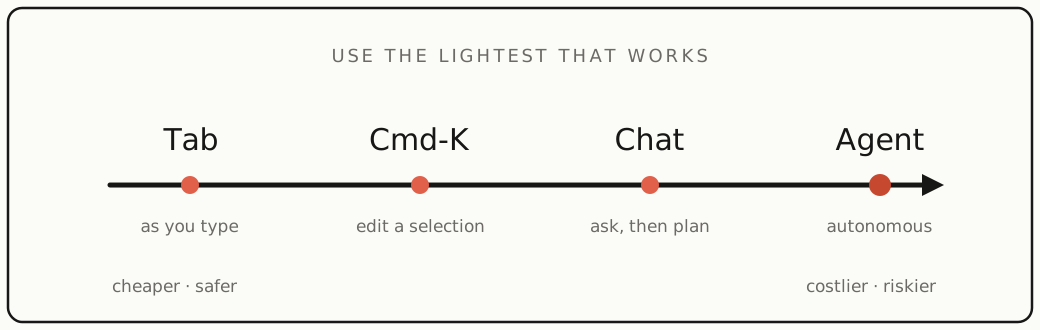
## Feed it context, do not flood it
Cursor pulls context two ways. It [auto-indexes your codebase](https://cursor.com/docs/context/codebase-indexing) into a local search index (ready at about 80% indexed, re-syncing every few minutes, and it respects `.gitignore` and `.cursorignore`). And you point it at things with @-mentions: `@file`, `@folder`, `@Docs`, `@Terminal`, past chats, and git diffs.
The rule that separates good results from bad: tag the exact files when you know which ones matter, and let the agent search when you do not. Dumping a pile of loosely related files does not help, it confuses the model and wastes budget. Add a `.cursorignore` so it skips build output, secrets, and vendored code.
## Write a rules file, and keep it current
The setup step that pays off most is a [rules file](https://cursor.com/docs/rules). Drop a short file in `.cursor/rules` (or a plain `AGENTS.md`) describing your stack, your conventions, and the patterns you want the agent to follow. Keep it under 500 lines, point at real files instead of pasting their contents, and treat it as living: every time the agent repeats a mistake, add a line that tells it not to. That one habit does more to stop the agent drifting than any prompt trick.
## Let the agent run, but on a leash
The agent is where Cursor earns its reputation and where it bites people. Cursor's own [agent best-practices](https://cursor.com/blog/agent-best-practices) line up with what burned users learned the hard way:
- **Plan before it builds.** Use Plan Mode (Shift+Tab) to get a written plan you can read and correct before any code changes.
- **Fresh chat per feature.** Long threads lose the plot. Start a new conversation for each logical unit of work.
- **Commit often and review every diff.** Watch the changes land line by line. Commit at each working step so you can roll back cleanly when it breaks something, and it will.
- **Set guardrails before any hands-off run.** Switch Run Mode to an allowlist and turn on file-deletion protection. Real users filed [bug reports of the agent modifying, deleting, and even committing files after they pressed Stop](https://forum.cursor.com/t/cursor-agent-is-acting-uncontrollably-after-prompts-are-stopped-modifying-files-and-even-committing-code/162740); the fix was exactly those two settings. Never let it auto-run terminal commands while it is reading untrusted web content. Cursor itself calls auto-run a convenience, "not a security boundary," because of prompt injection.
## The money: where Cursor quietly bills you
This is the part that turns a $20 plan into a $50 surprise, so understand the mechanic. Every paid plan is a dollar pool of model usage (Pro is $20/mo, Pro+ $60, Ultra $200, [per the pricing page](https://cursor.com/pricing)). **Auto mode**, where Cursor picks the model, runs on a heavily subsidized, much cheaper rate, so everyday work barely dents the pool. The moment you hand-pick a frontier model (Claude Opus or Sonnet, GPT, Gemini) for a big agent run, you are spending real API dollars. As of mid-2025 Cursor said $20 of Pro usage was about [225 Claude Sonnet requests](https://cursor.com/blog/june-2025-pricing) at typical token use. That is the whole lever: Auto for the everyday is cheap, hand-picked frontier models on long agent runs are not.
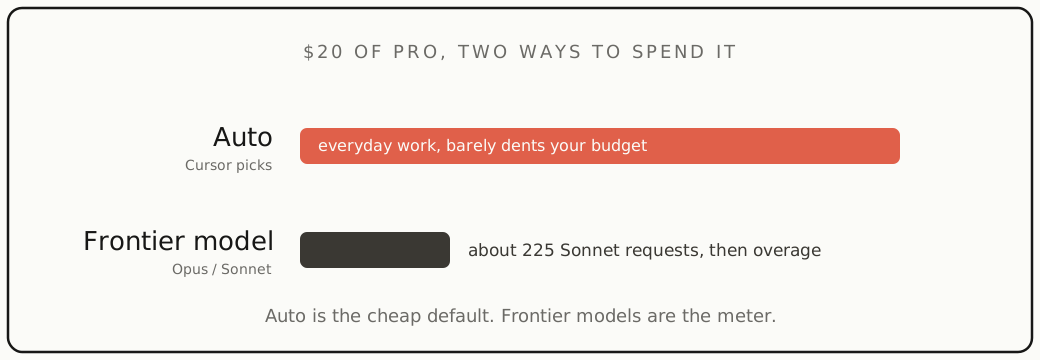
This is also where Cursor earned a real trust wound. In June 2025 it scrapped the old "500 requests a month" Pro plan for the credit pool and launched the $200 Ultra tier the same day. The rollout called it "unlimited usage" when that only ever applied to Auto, and heavy users got blindsided by overage bills. One Hacker News user reported $350 of overage in a week, and a team described a roughly $7,000 budget gone in a day (these are user reports, not figures Cursor confirmed). The CEO [apologized](https://techcrunch.com/2025/07/07/cursor-apologizes-for-unclear-pricing-changes-that-upset-users/) on July 4, saying "we didn't handle this pricing rollout well, and we're sorry," and refunded the affected window. The credit model itself was never reversed. So: watch the usage dashboard, set a spend limit, and do not be surprised that the meter is running.
## What real users love, and where it bites
The praise is consistent. Tab is the feature people would miss most. The VS Code lineage means no learning curve. The agent scaffolds whole features fast, full-codebase awareness gets called the standout, and aggregate ratings sit around 4.6 to 4.8 out of 5.
The complaints are just as consistent, and worth knowing before you commit:
- **Cost is unpredictable.** The dollar pool plus overage means a nominal $20 plan often becomes a $40 to $50 real bill. It is the number-one standing gripe.
- **"Auto got nerfed."** Through late 2025 and into 2026, [forum threads](https://forum.cursor.com/t/auto-mode-has-become-almost-unusable/153944) report Auto losing context, ignoring instructions, and making mistakes. Staff say Auto optimizes for cost and steer people to pick a model manually, which heavy users read as a quiet downgrade.
- **It breaks working code on big repos.** No AI tool can hold a large, mature codebase in context, and Cursor lags on files over a few hundred lines. On legacy systems, [the review tax outweighs the speed](/study/does-ai-coding-make-you-faster/).
- **Support is thin.** There is no live chat even on the $200 Ultra plan, only email.
The throughline: every fan who is candid says the same thing, review every agent diff yourself. It is non-negotiable.
## How builders are actually using it
The pattern across the forums is consistent: Cursor pays off when you stay in the loop on something you are building from scratch or already know. Real examples, in builders' own words:
- **First products from near-beginners.** In Cursor's ["built with Cursor in 2025" thread](https://forum.cursor.com/t/built-with-cursor-in-2025-share-your-projects/147737), a builder with little coding background made an iOS speech-therapy app for stroke survivors and went on to win a Cursor hackathon with it. Others in the same thread shipped a tattoo-shop booking SaaS and an automated trading backtester.
- **Speed on your own codebase.** A solo founder who fed Cursor many files at once for bug-finding and features called it ["jaw-droppingly good"](https://forum.cursor.com/t/cursor-has-literally-changed-my-life/142659) and reckoned his project grew as much in six days as it used to in two weeks.
- **Refactors that used to cost an afternoon.** On Hacker News a developer watched it ["refactor in a matter of minutes code that would've taken hours, correctly"](https://news.ycombinator.com/item?id=44168149); another said it ["has built near entire features for me"](https://news.ycombinator.com/item?id=43744228).
- **The autocomplete, constantly.** A common refrain: Cursor ["autocomplete (cursor tab) is the one feature I use constantly"](https://news.ycombinator.com/item?id=43899012).
- **Hands-off background jobs.** A solo SaaS owner runs Cursor's cloud agents on a schedule, calling them ["just prompts on a cron ... but super useful"](https://news.ycombinator.com/item?id=47736272).
The common thread is greenfield apps, code you already know, scoped refactors, and Tab. That is exactly the profile where Cursor earns its keep. Notice, too, that the same builders who rave about it are the ones who tell you to review every diff.
## Where it stops being worth it
The Primer rule is to know your off-ramp before the bill surprises you. Cursor is the right default for fast, in-loop building on small-to-mid projects. Here is when to reach for something else:
- **You mostly want inline completions and are watching cost.** [GitHub Copilot](https://github.com/features/copilot/plans) Pro is $10/mo, half of Cursor, runs inside the editor you already use, and a third-party 2026 benchmark put it slightly ahead on raw accuracy.
- **You want autonomous, scriptable, repo-level or CI work.** [Claude Code](https://www.builder.io/blog/cursor-vs-claude-code) is agent-first and bundled into a Claude subscription you may already pay for, so it can be close to free on top. The common 2026 verdict is to [use both](/primer/ai-coding-stack/): Cursor to amplify your own typing, Claude Code to hand off the autonomous runs.
- **You live in a big, mature codebase.** A 100,000-line project is millions of tokens, far more than any model holds at once, and Cursor adds lag on large files. Lean on tight manual scoping or a CLI agent.
- **You want model choice, the lowest light-use cost, or approval on every change.** Open-source bring-your-own-key tools like [Cline and Continue](https://www.morphllm.com/comparisons/cline-vs-cursor) are free extensions where you pay only for tokens, sometimes a few dollars a day, and gate every edit.
- **You need a different editor.** If you live in JetBrains, Vim, or Xcode, [Windsurf](https://uibakery.io/blog/windsurf-vs-cursor-pricing) now matches Cursor's price and covers more editors.
- **No source code can leave the building.** Even Cursor's Privacy Mode still sends code to the model provider. Air-gapped or regulated work needs a bring-your-own-key tool pointed at a local model, not any hosted editor.
Cursor is the most mature and pleasant AI editor for building in the loop, and Tab alone can justify the subscription. The credit model is the permanent catch, and the agent is only as safe as your review habit. Drive it on Auto for the everyday, leash the agent, review every diff, and keep one eye on the usage meter. Do that and it earns its place. Forget it and it writes you a bill, or a bug, you did not see coming.
---
# The AI coding stack I actually use: what's in my workflow
Section: The Primer
URL: https://okaneland.com/primer/ai-coding-stack/
No affiliate links in this post. Nothing here pays me. Just what I actually reach for after a year of building with AI tools daily, and where each one stops being worth it.
**For writing code:** I bounce between [an AI-in-the-editor tool](/primer/how-to-use-cursor/) and a chat model
in a browser tab. The editor integration is faster for small, in-context edits;
the chat window is better when I need to think through a problem out loud before
touching code. Using both, not picking one, is the actual answer most "X vs Y"
posts won't give you.
## Where it shines
Boilerplate, test scaffolding, unfamiliar APIs, and "explain this legacy file."
Genuine multi-hour-per-week savings, no exaggeration. The research backs this up too: [the speed gains are real but uneven](/study/does-ai-coding-make-you-faster/).
## Where it stops being worth it
Anything where being subtly wrong is expensive: auth, payments,
security-sensitive logic. I still write those by hand and use AI only to review.
The tool is a strong junior, not a senior; I don't merge what I can't read.
## The subscription math
I pay for two tools. It's real money each month, and it's worth it *for me*
because I ship for a living. If you're learning or building nights-and-weekends,
one paid tool plus free tiers is plenty, don't let anyone guilt you into the
full stack before you're earning from it.
## The one habit that matters more than tool choice
Keep a running file of prompts that worked. Your own library beats any tool's
defaults within a month.
What's in your setup, and where have *you* found the AI tools stop earning
their keep?
---
# Clay: the best prospecting engine we have tested, and the bill that comes with it
Section: The Proof
URL: https://okaneland.com/proof/clay/
We found 50 real leads, ran the six-provider email waterfall, and drove Clay's AI agent across ten companies on the live tool. The AI is the real thing and the coverage is high. The catch is the price and the learning curve.
## How we tested
We logged into Clay on the Free tier and drove the real product, not the demo reel. We built a lead list from scratch, ran the email waterfall on real people, tried the phone waterfall, pushed Clay's AI agent across ten companies, wrote personalized openers, and watched the credit meter the whole way. Everything below is what the tool returned, with the receipts. The whole exercise cost about 30 of the 2,000 monthly credits.
## Claygent is the standout
Clay's AI research agent, Claygent, is the thing that separates it from a database with a spreadsheet bolted on. We gave it a deliberately awkward job: find the current CEO of ten companies, names only. It went ten for ten. It got the easy ones (Tim Cook, Mark Zuckerberg, Andy Jassy) and, more tellingly, the hard ones: Waymo's co-CEOs, and Atlassian's Mike Cannon-Brookes, correct only if you know Scott Farquhar had stepped down.
Claygent on a current-CEO task: ten for ten, and a correct "Unknown" for Activision rather than a guess.
The receipt that mattered was Activision. There is no current CEO; Bobby Kotick left after the Microsoft acquisition. Claygent did not guess. It returned "Unknown," with a written rationale ("the current leadership team identifies Rob Kostich as President, but does not list a Chief Executive Officer"), a confidence rating, and the two pages it had actually visited (the company's About page and the Activision Blizzard newsroom). For a tool whose entire job is to fill cells, refusing to fill one when the answer is "no data" is the behaviour you want and rarely get. It cost about two credits a row, and Clay's own AI wrote the structured prompt and picked the model (clay-neon) without us touching either.
The receipt under the cell: Claygent's reasoning, its confidence, and the exact pages it visited, before returning "Unknown."
The "without us touching either" is worth dwelling on. We typed a plain sentence; Clay's own AI classified it as a web-research task, selected its mid-tier model (clay-neon over the cheaper clay-helium and pricier clay-argon), and wrote a structured prompt that included "do not infer or guess; extract only what is explicitly stated." That is the thing that flattens the learning curve: you describe the outcome, and the tool configures the agent.
The AI configures the AI: from one plain sentence, Clay picked the Claygent use case, the clay-neon model, and wrote the structured prompt itself.
## Finding the leads is the easy part
We typed a plain-English target into Clay's lead finder, Sculptor: "heads of marketing at B2B SaaS companies, 11 to 200 staff, in the US." It built nine structured filters from that sentence, queried a database it reports as 338 million people, and returned 3,063 matches, real working marketers at real small SaaS companies, not the famous names a demo would show. We capped the import at 50 (two per company, for variety) and pulled them into a table. That import was free. In Clay, finding and loading leads costs nothing; the meter only starts on enrichment.
Sculptor turned one sentence into nine filters over a database it reports as 338 million people: 3,063 matching marketers.
## The waterfall is the real product
The headline feature is "waterfall enrichment," and it earns the name. We added a Work Email column, and Clay expanded it into a visible chain of providers: it tries the first, validates the result, and only if that comes back empty does it spend a credit on the next, all the way down. On our 50 real SMB leads it found a valid work email for nine of every ten, and we watched it work: for one lead the first four finders returned nothing and the fifth, Findymail, landed the address. Downstream columns read "Run condition not met," which is the waterfall doing exactly what it claims, stopping the moment it has a match so it does not pay every provider on every row. It ran about a credit a row, and the run dialog quoted the cost ("run 49 rows, 24.5 credits") before we committed to it.
The waterfall, found: nine of ten work emails, with the downstream providers skipped ("run condition not met") once a match was in.
That is the genuine advantage over a single-source tool like Apollo: instead of one provider's coverage, you get the union of many, in priority order, billed only for the ones that run.
One flag on that nine-of-ten, because it matters: these were marketers at real but findable SaaS companies, the friendly end of the distribution. Coverage falls on smaller, older, or non-US firms, and on people who keep a thin web footprint. Treat 90% as the top of the range, not the average. The independent test we trust, chaining four providers across 200 harder prospects, [landed between 40% and 78%](https://hackceleration.com/clay-review). The waterfall genuinely beats a single source; it does not repeal the limits of the underlying data.
## Personalization works, with an asterisk
We asked Clay's AI to write a one-line cold-email opener for each lead from their title, company, and LinkedIn headline. It auto-routed the job to a cheaper model than the research agent (one credit a row instead of two) and produced openers that were genuinely specific: "As VP Marketing at 1mind, your AI-native GTM focus and GTM AI Academy work stood out to me." The asterisk is that four of five opened with the same "As [title] at [company]" scaffold. This is real personalization at scale, but it is a draft, not a send. The tool will pull the right detail; it will not give you a voice.
Specific, and templated: most openers reach for the same "As [title] at [company], your [X] stood out" scaffold. Real detail, not a finished line.
## Then you act on it
A list you cannot use is just a bill, and this is where Clay stops being a spreadsheet. From the same table you can download a CSV, push to a CRM, send to a sequencer like Smartlead or Instantly, or run an email campaign inside Clay itself. It even exposes its enrichments to ChatGPT and Claude over an MCP server, so you can ask an assistant to enrich a lead and have Clay answer.
Not a dead end: from the table you can push to a CRM, a sequencer, a CSV, or a native Clay campaign.
The other half is Signals: turn any enrichment into a trigger and Clay watches for the moment to reach out, a job change, a new hire, a promotion, a funding round. That is the difference between a static list and timed outbound, and it is the part most single-source tools simply do not have.
Signals: monitor a job change, a new hire, a promotion, or a funding round, and trigger outbound on the moment it happens.
## The money is the catch
Clay's pricing is a metered credit system, and it is where people get surprised. Two facts set the frame. First, the good data is the expensive data: a mobile-phone lookup is a fourteen-provider waterfall at about 11 credits a row, roughly ten times the cost of an email, so phoning the same 50 leads would run about 570 credits. Second, the Free tier is a demo: 2,000 credits a month, and phone enrichment is blocked entirely. When we tried to run it, Clay refused with a flat "your subscription does not allow this integration to be added." Email and AI enrichment work on Free; phones and the heavier providers want a paid plan.
Phones are the budget-eater: a fourteen-provider waterfall at about 11 credits a row, much of it tagged "Upgrade" and blocked on the Free tier.
The paid plans are not cheap. Clay [restructured its pricing](https://www.clay.com/pricing) in March 2026 into Launch (about $167 to $185 a month) and Growth (about $446 to $495 a month), plus custom Enterprise. Credits meter from roughly $0.05 each. Used well, on a tight ICP with the right waterfalls, that is a fair price for the coverage. Used carelessly, with broad lists and the expensive enrichments switched on, it is how a $349 plan becomes a $349-plus-overage plan.
The Free tier gives 2,000 credits a month. Our whole test, Claygent and the email waterfall included, spent about 30.
## The real cost per lead
Clay never quotes you a price per lead, so here is the math from our runs, at Clay's own credit prices (data credits start around five cents each). A verified work email ran about a credit, call it a nickel. A Claygent research column, like our CEO lookup, ran about two credits, a dime. A mobile number is the outlier at roughly eleven credits, north of fifty cents, and it is paid-tier only.
Now put it on a real list. Enriching a thousand leads with a work email and one AI research column is around three thousand credits, on the order of $150 of credit value, before you have written a word of outreach, and that sits on top of the monthly plan. Add phone numbers and you can double or triple it. That is the number nobody puts in front of you, and it is the whole reason the meter, not the sticker price, is the thing to watch.
The flip side is the good news: an email at a nickel, found by the union of six providers, is genuinely cheap per unit. Clay does not get expensive because any one lookup is dear. It gets expensive when you run a lot of them, or reach for the dear ones, without watching the total.
## Where it bites
The learning curve is the real tax. Clay's surface area is enormous: tables, waterfalls, signals (job changes, new hires, funding, hiring), functions, a sandbox mode, and an MCP server that pipes its data into ChatGPT and Claude. The power is the point, but it is a lot, and we fumbled the sandbox toggle ourselves on the first try, which is the single most common complaint in reviews. Plan a week of real use before it pays you back.
Two more cautions. Clay's marketing implies it can triple your match rate; the independent test we trust put the real uplift closer to a doubling, which is still good but not the headline. And, like every tool in this category, it will not fix a bad list or a weak offer. It is a faster way to be right or wrong; the strategy is still on you.
## Clay, or something cheaper?
Clay is not the only way to find an email, and most readers should not start here. The real question is whether the waterfall and Claygent earn the premium over a flat-rate tool.
If you need a few hundred leads a month for a tight, well-known ICP, a single-source tool is cheaper and far simpler. Apollo bundles a contact database and a sequencer for tens of dollars a seat, not hundreds; Instantly and Smartlead handle sending and basic enrichment in the same range. None of them match Clay's coverage, but for an obvious ICP, one provider often gets you most of the emails for a fraction of the price and none of the learning curve.
You move to Clay when you hit the ceiling of that: when single-source coverage leaves too many rows blank, when you need research or scoring per lead that no database ships with, or when you want signals-triggered outbound at volume. That is the job the waterfall and Claygent are built for, and nothing flat-rate competes. The order is the whole point: buy the cheap tool first, and graduate to Clay when you have a reason, not a hunch.
## The verdict
Clay is the most capable prospecting and enrichment tool we have driven, full stop. The AI agent is accurate and refuses to hallucinate, the email waterfall genuinely beats single-source coverage, and the whole thing is wired to act on what it finds. It earns the verdict.
The scope on that verdict is tight, and it is the whole point. Clay is worth it for someone running real outbound volume who will learn the tool and watch the meter. For that person it is a clear yes. For the solo builder who needs a few dozen leads a month, it is overkill and overpriced, and a $30 Apollo or Instantly plan does the job with a fraction of the learning curve. Buy Clay for the volume, not the novelty, and keep one eye on the credits.
---
# Perplexity Max: the deepest toolset in AI search, and where it still leaks
Section: The Proof
URL: https://okaneland.com/proof/perplexity/
We bought Max, signed in, and drove every tool: nine models, Model Council, Deep Research, the Computer agent, the premium data connectors, Finance and Academic. The advanced tools are genuinely powerful. The everyday search still leans on content mills, and most people do not need the $200 tier.
## How we tested
Our first pass was the free, logged-out version: four queries, a false-premise trap, a stats trap, and a hard signup wall after three searches. It refused to fabricate and got the facts right, but it cited content mills and gated us fast.
So we bought **Max**, the $200-a-month top tier, signed in, and drove every tool in it: the full model picker, the four search modes, Model Council, Deep Research, the Computer agent, Spaces, Connectors, Workflows, Memory, and the Finance and Academic surfaces. Everything below is what those tools actually returned, with the receipts.
## What Max actually unlocks
Two things gate behind Max. First, the **models**. The picker carries nine: Best, Sonar 2, GPT-5.4, GPT-5.5, Gemini 3.1 Pro, Claude Sonnet 4.6, Claude Opus 4.8, Kimi K2.6, and Nemotron 3 Ultra. Two of them, **GPT-5.5 and Claude Opus 4.8**, are Max-only. Second, the **modes**. The search box switches between Search, Deep Research, Learn step by step, and **Model Council**, which is also Max-only.
The roster. Nine models, with GPT-5.5 and Claude Opus 4.8 reserved for Max.
## The everyday answer is genuinely strong
We asked Claude Opus 4.8 to compare a year of running Llama 3.3 70B locally on a Mac Studio against a frontier API, with the math. It did not hand-wave. It separated the two cost structures (local is a fixed cost with near-zero marginal cost; API is pure pay-per-use), priced a Mac Studio M3 Ultra with 192GB at about $5,800 plus roughly $95 a year of power, modelled light, moderate, and heavy API usage in a table, and then added the caveat that mattered: GPT-5.5 outperforms Llama 3.3 70B, so this was never a quality-equal trade. Fifteen sources, sound reasoning.
Opus 4.8 on a cost question: two cost structures, real prices, and the caveat that the two options are not quality-equal.
## Model Council is the standout
This is the feature that justifies the tier for a certain kind of user. Ask a contested question and Model Council convenes three frontier models, here **GPT-5.5, Claude Opus 4.8, and Gemini 3.1 Pro**, each reasoning independently, then synthesizes them. We asked whether a bootstrapped solo founder should build on a frontier API or self-host an open model.
The output is not one answer. It is a "Where Models Agree" table (all three converged on starting with an API and deferring self-hosting, with the GPU utilization trap as the key reason), a "Where Models Disagree" table, a "Unique Discoveries" list (Opus flagged that TGI entered maintenance mode in December 2025; Gemini flagged GPT-5.5 cached-input pricing at $0.50 per million), and a synthesis. It even noted that GPT-5.5 "naturally highlights its own model's strengths," a sharp piece of self-awareness most single answers never give you.
Model Council: three frontier models, a checkmark grid of where they agree, plus where they split and what each found alone.
## Deep Research is consultant-grade, with a catch
We asked Deep Research for the real total cost of ownership of a small AI SaaS in 2026. It ran eight steps, fired off three rounds of searches (inference pricing, churn benchmarks, Stripe fees and hidden costs) with "Insights" passes between them, and wrote a structured report: an executive summary, four pillars (model inference, cloud hosting, Stripe fees, churn) each with their own pricing tables, and a synthesized cost-stack model at ~$500K ARR. It is the kind of brief you would otherwise pay a consultant for, and you can export it.
The catch is the sourcing. Deep Research pulled from dozens of low-authority SEO blogs (Groovy Web, Bananalabs, contracollective, zendevy, churntools) alongside the few solid ones, and at one point cited a politics magazine for a claim about Anthropic's agent billing. The structure is excellent. The inputs need a human pass.
Deep Research, "Completed 8 steps": a multi-section TCO report with pricing tables. The structure is consultant-grade; the sources are a mixed bag.
## Computer is an agent that actually ships
Computer is the agent. You describe a job and it plans a task list, researches, builds an artifact, and shares it. We asked for a spreadsheet comparing six mini PCs for local LLMs, with citations per row. It wrote a four-step plan, researched across **47 sources**, and produced a real Excel file (Mac Studio M3 Ultra: 512GB, $9,499, ~14-16 tok/s; Mac mini M4 Pro: 64GB, $2,299, ~10-15 tok/s, and so on) in **1 minute 21 seconds**, then offered follow-ups including a monthly price monitor. The same engine builds slide decks, websites, and reports.
The Computer agent: a four-step plan, 47 sources, and a finished Excel spreadsheet in under 90 seconds.
## Academic fixes the thing that was broken
The source-quality problem has one clean fix: **Academic** mode. We asked whether peer-reviewed studies show AI coding assistants improve productivity. The sources shifted to arxiv, SSRN, Reuters, and InfoQ, and the answer was rigorous: the Microsoft and Accenture randomized trials (4,867 developers, +26% tasks), the METR slowdown (experienced developers took 19% longer while believing they were 20% faster), and a 37-study systematic review, laid out in a comparison table. That is the same evidence our own [Study on AI coding speed](/study/does-ai-coding-make-you-faster/) is built on, sourced properly.
Academic mode: the same question, but sourced to arxiv, SSRN, and Reuters instead of content mills.
The other half of the data story is **Connectors**. From the Pro tier up, Perplexity includes premium research data that normally costs a fortune on its own (PitchBook, CB Insights, Statista, Wiley journals, and a US case-law library), and connects to your Google Drive, Gmail, and Dropbox so it can answer over, and act on, your own files. Worth being precise: this is a Pro feature, not a Max one, which is part of why Pro is enough for most people.
Premium data, included: PitchBook, CB Insights, Statista, Wiley, and a legal library, plus your own cloud drives.
## Finance is a terminal in the chat
The Finance surface is a Bloomberg-lite: live futures and the VIX, real-time quotes, market-news summaries, a screener, earnings, congressional-trade tracking, a watchlist, and a portfolio you can sync through Plaid. You can ask plain-English questions about any of it.
Finance: live quotes, charts, market news, a screener, and Plaid portfolio sync, all queryable.
There is more we drove and will not belabor: Spaces (custom collections with their own instructions and files), Workflows (pre-built agent recipes for financial models, clinical briefs, store optimization), Memory (a persistent, structured store of what you have worked on), Skills, and the Health and Patents surfaces.
## Where it still leaks
The one finding from the free-tier review survives Max intact: the everyday search and Deep Research over-trust the open web. Perplexity sells "the most trusted sources," but in practice the default sourcing skews toward SEO content farms, and the deeper the research, the more of them it rakes in. Academic mode and the premium connectors are the antidote, but they are opt-in. If you run a default query and act on the headline number, you are trusting a blog Perplexity found, not a source it vetted. Cited is not the same as sourced.
## Real cost
The free tier exists but gates after a few anonymous searches. **Pro is $20 a month** ($17 when [billed annually](https://www.perplexity.ai/pro)) and already includes the Computer agent, the premium data connectors, and most of the models, which is the core of what most people need. **Max is $200 a month** ($167 annually), ten times the monthly Pro price, and the extra is narrow but real: the frontier reasoning models (GPT-5.5 and Claude Opus 4.8), Model Council, and much higher limits for running Deep Research and the agent at scale. The gap is not the quality of an ordinary answer, or even the premium data. It is the top models, the council, and the ceiling on heavy use.
## The verdict
Situational, and that is not a knock. Perplexity Max is the deepest toolset in consumer AI right now: Model Council, Deep Research, and the Computer agent each did real, useful work in our tests, and the included premium data is a genuine edge for anyone who needs it. If you are a founder, analyst, or researcher who will run deep reports, convene the model council on hard calls, and let the agent build things most weeks, the $200 pays for itself.
If you are not, you will spend $200 to use a $20 product. Buy Pro, turn on Academic mode for anything that matters, and keep clicking through to the sources. The tools are extraordinary. Most people just do not need this many of them.
---
# Surfer SEO: a strong scoring engine wrapped in a paywall maze
Section: The Proof
URL: https://okaneland.com/proof/surfer-seo/
We ran Surfer end to end on a live site with Search Console connected, then checked our verdict against what real users report. The dual SEO and AI-Search scoring is real and ahead of older tools. The AI writer inventing a "we tested it" claim is not.
## How we tested
We did not read other people's reviews and call it a verdict. We ran Surfer ourselves, on a live site, with Google Search Console connected, and drove every tool in the sidebar. The test workspace was a real publication (vettedconsumer.com), and the keyword we built a brief for was "best mini pc for local llm," a genuine buyer-intent query in that site's niche. Everything below is what we saw, with the screenshots to prove it. Then we checked our verdict against what other users report, and re-fetched every outside quote from its source.
The actual test: a real buyer-intent query in a real workspace, not a canned demo.
## What is genuinely good
**The dual Content Score is the real product.** When you build a brief, Surfer runs a "Deep Research" step that does two things at once: it crawls the live Google SERP (ten ranking pages) and it scrapes the answers that ChatGPT, Gemini, Perplexity, AI Mode, and Google's AI Overviews give for your query. From that it builds two separate guideline sets and scores your draft on both SEO and AI Search. That AEO/GEO angle is where the market is heading, and Surfer is further along than the older keyword-density tools.
Deep Research running live: it scrapes ChatGPT, AI Overviews, Gemini, AI Mode and Perplexity for the AI-Search guidelines, and crawls all 10 Google results for the SEO ones. That is the dual scrape, in motion.
The scoring engine itself is mature. We let Surfer generate a full listicle, and it came back at **90 overall, 79 on SEO and 100 on AI Search**, with 81 entities to cover, recommended headings, and a one-click Auto-Optimize. Green means you have used a term enough, red means add more. It is the most complete on-page guidance we tested.
The dual score: 90 overall, 79 on SEO and 100 on AI Search, with the entities to cover down the side.
**The Search Console connection is the standout for an existing site.** The Content Audit and Recommendations pulled our real ranking pages and flagged real opportunities: a post sitting at position 41 with a low SEO score, another ranking position 3, a third at position 6. That is concrete, do-this-next guidance, not vanity data.
Real pages, real positions. The DGX Spark post is stuck at 41 with a score of 33; two others sit at 3 and 6.The connected Performance view: 319 impressions, 2.2% average CTR, average position 12.8.
## Where it breaks
**The AI writer invents authority.** This is the one that matters most. In the draft it generated, unprompted, Surfer wrote: "We tested each against real-world inference workloads using popular frameworks and quantization formats." Nobody tested anything. The model fabricated a testing claim to sound credible. For any publisher whose whole value is receipts, that is a line you would have to hunt down and delete in every single draft, and one slip publishes a lie.
The receipt, straight from the editor: "We tested each against real-world inference workloads using popular frameworks and quantization formats." Nothing was tested. It scored 90 all the same.
The rest of the writing is competent but generic, and it ignored the voice instruction we gave it ("skeptical, no hype, real RAM and VRAM numbers"). Generation was also slow, two to three minutes for one listicle. Treat the output as a scored first draft to rewrite, never as something to ship.
The full listicle in the editor: competent structure, generic prose, and it ignored the voice we asked for.
## The paywall maze
Here is the part the pricing page does not make obvious. On the plan we tested, most of the headline tools were locked, each behind a different upgrade:
| Tool | What it costs to unlock |
|---|---|
| Keyword Research | Upgrade to Standard |
| AI Visibility / AI Tracker | Upgrade to Standard |
| Topical Map | Upgrade to Pro |
| Topic Research | Upgrade to Pro |
| Audit | Upgrade to Pro |
| SERP Analyzer | Upgrade to Peace of Mind (the top tier) |
So the marquee "be the brand AI talks about" pitch, and the core SEO research tools, are not in the entry plan. What you can actually use at the bottom is the Content Editor plus the Search-Console-fed views. The SERP Analyzer, oddly, is reserved for the most expensive plan of all.
The SERP Analyzer sits behind the top Peace of Mind tier. Each major tool had its own upgrade wall.
## What the upgrade actually buys
After the first pass, Surfer's support team switched on a Pro trial, so we went back and drove every tool the entry plan had walled off. Most of them are the reason to pay.
**Keyword Research** clustered our seed "mini pc for local llm" into eleven keyword groups, each tagged by search intent and carrying a search volume and difficulty score, and it exports to CSV. The clustering drifted toward "small llm" over the "mini pc" hardware angle, but the data is real and usable.
Keyword Research, unlocked: eleven clusters, each tagged by intent and carrying a search volume and difficulty score, exportable to CSV.
**Topical Map** built a 101-topic content plan across clusters, every topic carrying difficulty, search volume, intent, and a one-click "Create" that opens a brief in the editor. This is the planning layer the cheap plan is missing.
The Topical Map: 101 topics across clusters, each with difficulty, volume, intent, and a Create button.
**Audit** is the one we would actually keep. Pointed at a live page (our own RTX 3090 review), it returned a Content Score of 30 and asked for at least 38 more, flagged that 75 of 95 important terms were missing, and cleared internal links and word count. That is a concrete punch list for an existing page, not vanity data.
The Audit on a live page: Content Score 30 with 38 to go, 75 of 95 important terms missing, internal links and word count cleared.
**Topic Research** and **AI Tracker** unlocked too. AI Tracker is the "be the brand AI talks about" feature: you add up to 50 prompts and it tracks where your brand turns up in AI answers. That is the AEO play, and it needs Pro.
**The one that stays locked is SERP Analyzer.** Even on Pro it is gone: not in the sidebar, and its page loads blank, because it lives on the top "Peace of Mind" tier above Pro. So the single most expensive tool is still out of reach unless you buy the most expensive plan.
The takeaway: the entry plan is the Content Editor and little else, and Pro is where Surfer turns into a real research suite. If you are going to pay for Surfer at all, Pro is the floor that makes it worth the money. Just know the SERP Analyzer is not included even then.
## Does this hold up for other people?
We did not want the verdict to rest on a single test, so we read what other users report and re-fetched every quote from its source. Two things to know first. Surfer's headline ratings are rosy and partly managed: Capterra sits at 4.9 out of 5, G2 at 4.8, and TrustRadius openly tags some of its reviews "Incentivized." So we weighted candid forum threads and the low-star first-party reviews over the near-perfect averages.
On the fabrication, we are not alone. A Capterra reviewer describes double-checking the AI's statistics and references, only to find them ["either inaccurate or completely fabricated"](https://www.capterra.com/p/218703/Surfer/reviews/). That is the same failure we hit, reported by someone with no reason to invent it.
The generic-output complaint is the most repeated thing across independent reviewers. One writes that the drafts ["sound like every other AI-generated article"](https://konabayev.com/blog/surfer-seo-review/); an owner-operator who dropped the tool says it was ["adding words just to add words, inserting paragraphs just to fill space"](https://zzzcode.ai/blog/en/9/surfer-seo-review-2025-why-it-didnt-work-for-me).
The paywall friction we hit is the single loudest billing complaint. Paying users report that ["even if you pay a subscription, you're still limited with credits"](https://www.capterra.com/p/218703/Surfer/reviews/), and the tier trap is exact: one reviewer needs ["more than the 30 available with the $99 plan, but with the more expensive plan, I don't use all of them"](https://www.capterra.com/p/218703/Surfer/reviews/). On the candid BlackHatWorld forum, cost is the top reason high-volume publishers leave; one writing about 100 articles a month found it ["too expensive"](https://www.blackhatworld.com/seo/surfer-seo-alternatives.1516745/) and moved to cheaper tools like NeuronWriter and SurgeGraph.
One place our test was too kind. We rated the AI-Search scoring highly; people who build in that space are more skeptical. A reviewer calls it ["an SEO tool with an AEO feature bolted on, not a purpose-built AI visibility platform"](https://www.tryprofound.com/blog/surfer-seo-review) that cannot tell you whether AI models actually cite your pages. That critic sells a competing product, so weigh it accordingly, but the gap is real: a high score is not proof of a citation. A long-time practitioner puts the score in its place: ["I treat content score as a guardrail, not a law"](https://www.kristian-larsen.com/reviews/surferseo-review/).
For balance, the praise is real too. Plenty of reviewers call Surfer a ["comprehensive SEO tool for half or one third of the price of competition"](https://www.capterra.com/p/218703/Surfer/reviews/). The pattern that holds up across all of it: people keep Surfer for the optimization, and grumble about the credits and the writer.
## Real cost
Standard is $119, Pro is $219, and Peace of Mind is $359 per month, billed yearly. There is a 7-day money-back window rather than a true free trial. Budget for the tier that actually contains the tools you came for, which for most people is not the cheapest one.
## The verdict
Situational. If you run a content operation and will lean on the SEO plus AI-Search scoring and the Search Console audit every week, Surfer earns its place, and the AEO scoring is a real edge right now. If you are a small team hoping the AI writer will produce publish-ready posts, it will not, and it will quietly try to put fabricated testing claims in your mouth. Buy it for the score, not the writer, and price in the tier you will actually need.